


How to completely uninstall CS6 Web and Design, can't delete all folders
Hi all, I need help.
I try to read the post in this forum and follow the instruction to remove CS 6, using "AdobeCreativeCloudCleanerTool.exe".
After I restart the computer, I found the icon of the app and folder is still there in my window programe bar and taskbar. So I contact Adobe support. He requested to remote control my computer but as security reason I refused. He taught me delete some folders and still there are folders in Acrobat and pdf related files failed to delete no matter how I try...
C:\Program Files (x86)\Adobe\Acrobat 10.0
C:\Program Files (x86)\Common Files\Adobe\Acrobat\ActiveX
C:\ProgramData\Adobe\Adobe PDF\Distiller
These 3 folders have some files I can't delete no matter how I try...sometimes it said it requires "system" permission, sometimes it said it requires "adminstrator" permission (but I'm the admin, some other files request admin permission and I can delete them)
I restarted the computer, now this screenshot comes out "twice" everytime I restart my computer:
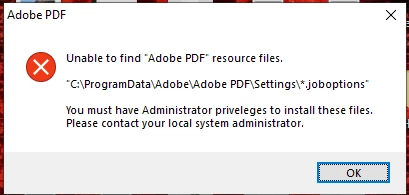
I remember I delete that folder already when the customer support told me to delete all files in C:\ProgramData\Adobe\
I really want to delete all adobe CS 6 before I install the new subscription. How to do it if I can't let the customer support remote control my computer? And how to fix this pop up?
Thanks
 AdChoices