


linseyf95755091
Participant
May 1, 2018
Answered

How to continuously highlight or underline text in a pdf on Adobe Acrobat?

  • May 1, 2018
  • 4 replies
  • 18741 views

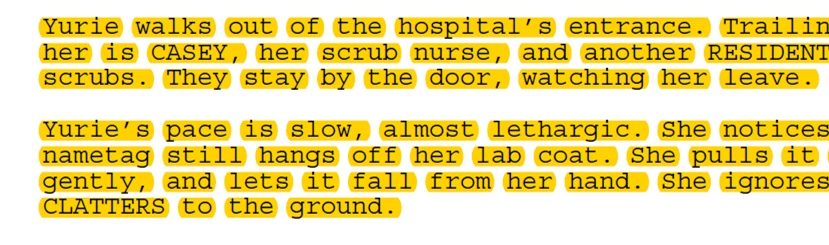
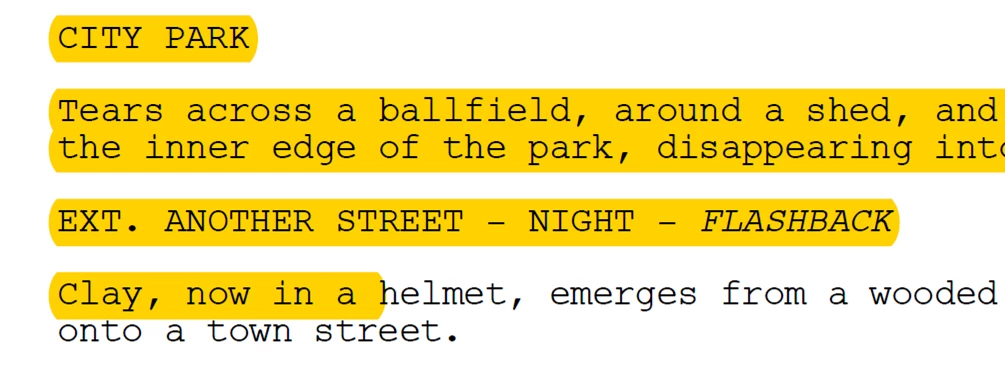
I am trying to highlight and underline text on a pdf opened in Acrobat, but the highlight tool only works on each individual word, so when I try to highlight an entire sentence or paragraph, each individual word is highlighted with blank spaces in between. It is annoying and jarring to read an entire paragraph like that. On some documents I can automatically highlight continuously but on others it is broken up. How can I adjust the highlight/underline tools so the whole sentence or paragraph is highlighted continuously without spaces in between?

What I don't want:
What I do want:
Correct answer nagaguard

I had the same problem of broken word-by-word highlights. I was able to achieve the contiguous highlight be redoing the optical character recognition (OCR) in the PDF. First, I ran the tool "Remove Hidden Information" to render the words unsearchable. Then, I ran the tool "Recognize Text".  Optionally, I also like to use the setting "Searchable Image (Exact)" when recognizing text. After performing these two steps, contiguous highlighting was achieved.

4 replies

Participating Frequently
December 2, 2024

I have tried everything listed in the post as of Dec 2 2024.  The best I can get is continuous highlighting that still does not include highlighted spaces after periods, nor highlighted spaces even after a comma.  I have yet to check for other punctuation, such as a semi-colon.  I cannot even highlight a complete sentence if there is a comma in the sentence.


At least a step in the right direction from ALL spaces having no highlighting.  It seems to have happened after 1) removing the preferences file as mentioned, 2) "sanitizing" the document using " Remove Hidden Information", then 3) running OCR using the setting "Searchable Image (Exact)".  I do not know if removing and causing the recreating the preferences file played a part.


This is NOT what I what I want my document to look like nor what I expect from Adobe.


Has anyone else here had results that simply highlight everything selected?  Do I have to hunt for an outdated version of Acrobat Pro?


This is ridiculously unacceptable from Adobe and seems such a simple and fundamental issue - an issue that was never a problem in the past.  Thanks very much to everyone for all the help and guidance here.  I'll be checking back hopeful for information for a full solution - a solution to full highlighting that even rudimentary text editors have as the default.  -Jay Cordova/Atlant

nagaguardCorrect answer
Participant
December 15, 2023

I had the same problem of broken word-by-word highlights. I was able to achieve the contiguous highlight be redoing the optical character recognition (OCR) in the PDF. First, I ran the tool "Remove Hidden Information" to render the words unsearchable. Then, I ran the tool "Recognize Text".  Optionally, I also like to use the setting "Searchable Image (Exact)" when recognizing text. After performing these two steps, contiguous highlighting was achieved.

Ty-orh
Participant
April 5, 2024

This did not work for my document.  This is so frustrating.  Adobe should fix this issue.  It has been a problem for awhile.


Ty
Amal.
Community Manager
Community Manager
April 10, 2024

Hi there


Have you tried the steps shared in the correct answer? Please give them a try and see if that works.


Let us know if you experience any trouble and need more help.


~Amal

matthewl85098861
Inspiring
March 25, 2021

I have the same problem.  I am reading a technical article that has full justification and the highlighting has gaps between words when they are spaced too far apart because of the full justificaiton.


Adobe, please provide a solution for continuously highlighting across words, or at least answer@ [PERSONAL INFORMATION REMOVED PER POLICY - THIS IS AN OPEN FORUM, NOT ADOBE SUPPORT, PLEASE DO NOT POST PERSONAL INFORMATION].


Thank you.

Amal.
Community Manager
Community Manager
March 25, 2021

Hi Matthewl


Hope you are doing well and sorry for the toruble. As described the highlight is non continuous.


Would you mind sharing the workflow/steps you did to create the PDF file?


Please try to create the PDF from the File menu > Create  in Adobe Acrobat Pro DC application and check if that helps.


Let us know if you experience any trouble and need more help.


Regards

Amal

Participant
September 27, 2021

Hi Amal,

Thank you for your helpful advice.  I checked for updates and am up to date, so we are good there.  Also, I am reluctant to reset my preferences in fear of changing preferences that I do not want changed.  Thus, I will just live with the breaks between words when highlighting.

Best regards,

Matt


Although this is not ideal, I found that these steps solved the problem for me:

  1. Open the PDF in Acrobat
  2. Print to PDF using Adobe PDF printer or Microsoft Print to PDF 
  3. Open the new pdf document
  4. Highlights are continuous
Bernd Alheit
Community Expert
Community Expert
May 1, 2018

How did you create the file?