


November 17, 2021
Answered

How to Disable Cloud Storage

  • November 17, 2021
  • 16 replies
  • 168169 views

Why are we not given a simple fix to Adobe Cloud storage that we can opt in or opt out?  With all the money your company is making with subscription services your company should have the funds to make this easier for the rest of us to do and you forget why you are in business to meet your consumers needs.


I do not want my files stored remotely.  I have my own backups for my work.  I had stopped using Adobe years ago and the only reason I am a subscriber is for my higher-educational purposes only.  So now it is more ardous to delete files that I no longer need after completion of my courses.


It was a sad day when Adobe went to cloud applications from desktop apps. 
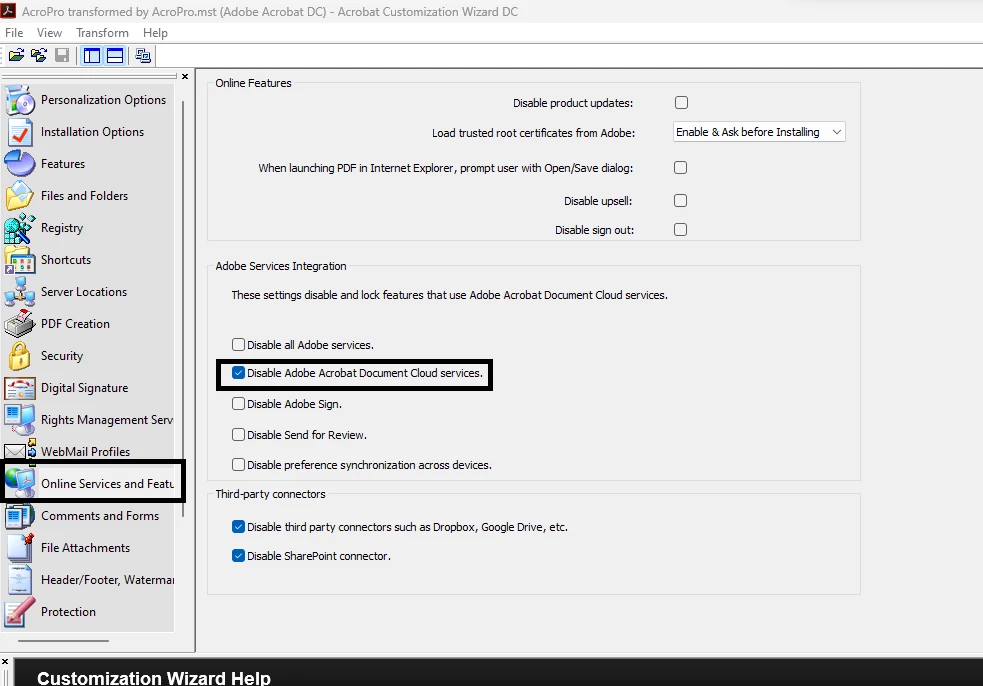
 

Correct answer default7xbx3q6c1uih

I also used the wizard, this worked for me:

16 replies

Participating Frequently
April 11, 2023

How can we keep Adobe Acrobat shared files from being stored in cloud? We cannot have files being stored in Adobe cloud storage due to government regulations and requirements. I have only seen registry change that removes the access to cloud storage from within Adobe Acrobat but that does not stop users from sharing Adobe Acrobat files (which places a copy of the file in Adobe Acrobat cloud storage).

Participating Frequently
April 11, 2023

Under Edit\Preferences\Reviewing\Share for review using Adobe's cloud storage - I unchecked the box. Closed Acrobat and reopened Acrobat. Could still share a file and it made a copy in cloud storage.

Participant
May 10, 2022

Is there a way to do this via the Admin Console for all users? I've been told possibly disabling the PDF services would work but can't find a concrete answer to that. 

Dave Creamer of IDEAS
Community Expert
Community Expert
January 5, 2022

I believe all aspects of Cloud storage are optional and dependent on user settings and workflow. 

David Creamer: Community Expert (ACI and ACE 1995-2023)
Participant
March 24, 2022

Nonsense. I could not find a way to turn off cloud storage. If you know how to do it, please post instructions here.


Adobe Acrobat Pro DC hijacks your internet connection for cloud storage and is truly horrible I migrated from the desktop version to the DC version, and rue the day. Great tool, but poorly implemented. Bloated beyond need, and no longer user friendly - it is now in the user hostile category.


There should be an EASY WAY to disable Adobc DC cloud storage. I have all my documents on One Drive which backs up to the cloud automatically. I don't want to have to do it twice, and I want to be able to control what is stored.

Dave Creamer of IDEAS
Community Expert
Community Expert
March 24, 2022

There is a utility to adjust Acrobat's cloud settings. But since you determined my post was nonsense, perhaps you can tell me what research you have done to warrant that response. 


BTW, none of my documents get uploaded to the DC cloud unless I want them to.

David Creamer: Community Expert (ACI and ACE 1995-2023)
Participant
December 21, 2021

Disabling online storage does not work!  It will automatically save any photo opened in Lightroom!

Dave Creamer of IDEAS
Community Expert
Community Expert
January 5, 2022

>>It will automatically save any photo opened in Lightroom

This is an Acrobat forum. There is a solution to this but you should post in the LR forum. 

David Creamer: Community Expert (ACI and ACE 1995-2023)
Participating Frequently
April 11, 2023

Mr. Creamer, need a solution to users sharing files and having a copy of the file being placed into Adobe Acrobat cloud storage please.

November 17, 2021

If I do this will this affect other aspects of CC suite?  Such as disrupting fonts selected?  I just don't want my documents being stored on the cloud. 


Why is there not an "incorrect answer option" icon? 

Inspiring
January 5, 2022

I, too, have spent unneccessary time trying to resolve OTHER issues using CC because my storage is full... I also do not want to store anything in Adobe cloud - I gave it a try last year and it was an awful experience and went back to google drive. I didn't realize it had continued to sync a folder on my desktop until these other CC features stopped working because of storage.

Waiting for an answer for this simple and reasonable request....

Bernd Alheit
Community Expert
Community Expert
November 17, 2021

In the preferences of Acrobat disable the online storage.

Participating Frequently
April 11, 2023

I don't have the option to "disable the online storage" in Adobe Acrobat (2023.001.20093). Could you please provide details regarding your solution? If you are talking about the setting Edit\Preferences\General-"Show online storage when opening files" that doesn't prevent someone from sharing a file and having that file be copied into Adobe cloud storage. If you are talking about the setting Edit\Preferences\Reviewing\"Share for review using Adobe's cloud storage"-I unchecked the box but was still able to share a file and it made a copy and placed it into Adobe cloud storage. If you are referring to the registry change that removes the option to access online storage from within Acrobat, that doesn't prevent someone from sharing a file and having a copy go into Adobe cloud storage.