May 20, 2019
Answered

How to disable popup menu when selecting text

  • May 20, 2019
  • 3 replies
  • 13036 views

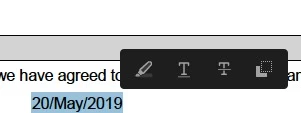
Something new has started today in Acrobat, which is when I select some text and let go of the mouse button, a small menu pops up to the right of the text.

I don't want this menu and it is very irritating. I have no idea where its come from or why and I cannot find any way to  remove/disable it.

I attach a screen shot of the menu,

Correct answer Meenakshi Negi

great, well thanks for finally responding to bcm1212's original post by saying clearly that "It is not possible to disable it."  and with that, thank you for answering my question.

if i can provide some feedback to the Adobe company on this feature in Acrobat, i'd like to say :

- the popup menu is annoying (to some users including myself) because it gets in the way and most often obscures the document i am trying to work on.  i don't like things getting in the way, and even though it is intended to be a helpful feature, it is often not helpful.

- i think this popup menu may be more helpful if it can be toggled to enable/disable and if it had the option to show up either right next to what you select (because i'm sure some people may appreciate how it is currently) or to show up maybe on a toolbar or something where it cannot obscure the document that i am trying to work on.


Hi All,

We have released an update today for Adobe Acrobat 2015, Acrobat 2017 and Acrobat DC in which you can hide the toolbar using a newly added preference. By default, the toolbar is enabled. Check the screenshot below:
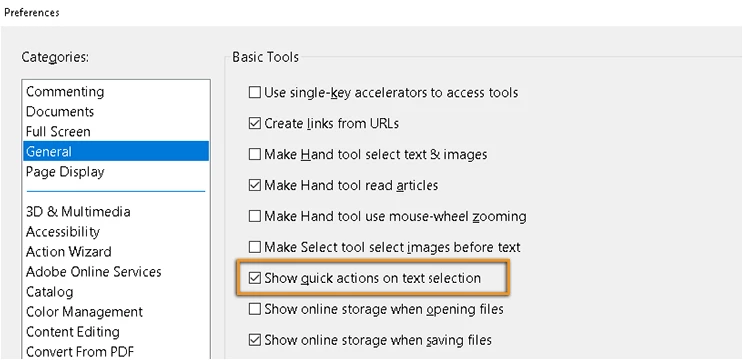
This update will be automatically pushed to all existing installations of Acrobat and Reader. If you want, you may also manually trigger the update early by opening the application and going to Help > Check for Updates.

You may refer to the following link to check the latest versions available. Release Notes | Adobe Acrobat, Reader

For more details on the new update, please refer to the following help document What's new in Adobe Acrobat DC

Let us know if you have any questions.

Regards,

Meenakshi

3 replies

New Participant
July 30, 2021

I can't stand this either, and MANY times it's right on top of my document. WHO WOULD THINK THAT IS A GOOD IDEA??? THIS IS THE WORST "IMPROVEMENT!"

try67
Community Expert
July 30, 2021

Did you read the thread? The reply marked as "Correct" explains how to get rid of this popup panel.

New Participant
November 5, 2024

But it is not being saved between sessions or documents. Is that supposed to be?

New Participant
May 21, 2019

Use annotation and drawing markup tools to add comments in PDFs, Adobe Acrobat and Acrobat Reader

> Note: In Acrobat Reader, complete commenting tools are available only in PDFs that have commenting enabled.

...commenting disable?

May 23, 2019

Could you imagine having to turn that off for every PDF?

Should be a preference or registry setting

Bernd Alheit
Community Expert
May 20, 2019

This is a new feature.

May 20, 2019

Its not a feature for me.

I don't want it.

May 20, 2019

Why did you select text?


To be able to copy it. The text in the screenshot is not the text I actually selected. I just selected the text in the screenshot as an example. The text I originally selected is a reference number, which I wanted to use in a filename, so I would copy it after selecting it.