

Participant
September 26, 2025
Question

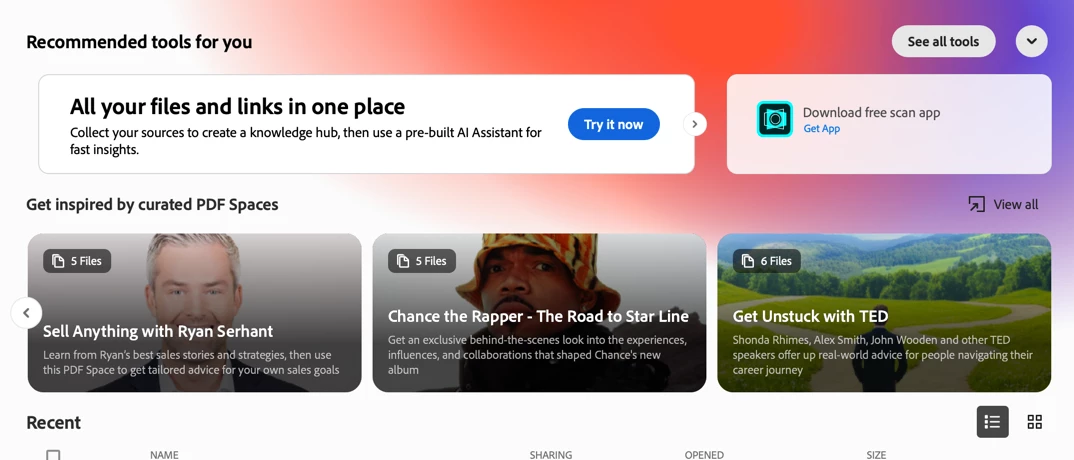
How to disable "recommended tools" and "Get inspired…" banners on launch?

  • September 26, 2025
  • 6 replies
  • 353 views

How do I stop Acrobat from displaying these annoying and instrusive banners whenever I open Acrobat on my Mac?

I feel like I'm running crappy adware…
6 replies

Jamison64
Participant
November 20, 2025

Whoops.. miss that one. It was already stated. Cudos Pkeshtgani

Jamison64
Participant
November 20, 2025

You can remove 'Get Inspired..' via Preferences / Generative Ai > Untick Show Ai Video cards 

Participant
October 24, 2025

you can remove it by going to perference > generative ai > uncheck it all!

Participant
October 24, 2025

 In continuous release version 2025.001.20756 there does not appear to be a preferences entry for Generative AI.  However, while looking for that (again) I did find a way to get rid of this visual pollution.  In Menu, under View, select "Disable new Acrobat".  Et viola!


https://helpx.adobe.com/acrobat/desktop/get-started/preferences-and-settings/switch-new-acrobat.html

Participant
October 24, 2025

Our Acrobat was installer was modifed by the Customizarion Wizard.  Our IT department may have removed the Generative AI options in the app.  Regardless, disabling  "New Acrobat" does the trick, as long as you won't miss any of the other features. 

Participant
October 9, 2025

I am paying for Adobe Acrobat; but it feels like it is finaced by advertisements. I have never seen so many annoying popups.

Participant
September 30, 2025

I have this request too.  I would really like to disable the "Get inspired by curated PDF Spaces" banner.  It smacks of MS putting Solitaire on enterprise licensed Windows 11.  

Meenakshi Negi
Community Manager
Community Manager
September 26, 2025

Hi rcostain,


Thank you for reaching out, and sorry about the trouble caused.


There is no default option in Acrobat to remove these banners. We will check with the team to see if they can be removed and share the correct information.

We appreciate your response.


Thanks,

Meenakshi
