


AntonyUpward
Participant
February 7, 2018
Answered

How to Display Number of Pages in Open PDF Document? (Used to be in Status Bar)

  • February 7, 2018
  • 4 replies
  • 65227 views

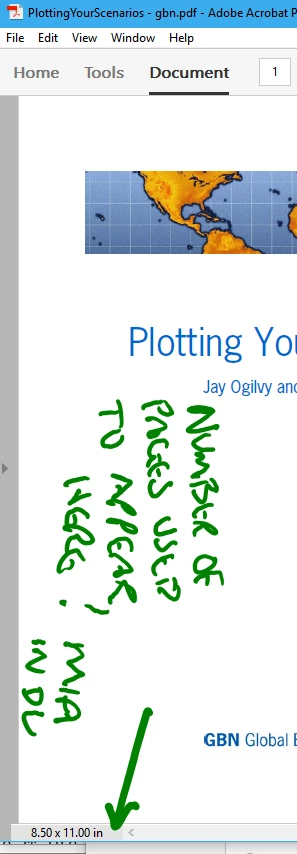
Hi, in earlier versions of Adobe Acrobat Pro the "number of pages" in the open document was displayed in the "status bar" at bottom left of window.

In AAProDC this is MIA.  Now the fastest way to get this information appears to be to click the arrow on the left of the window to open the pages pane.  Not as fast as the info being displayed alongside the page dimension information.

See screenshot below.

I've looked in the options/preferences to see if one can change what is shown in the "status bar" - but I don't see this possibility.  Can Is this possible?

This functionality appears to have also disappeared in Acrobat Reader
Correct answer PositiveEnergy

Restore Menu Bar in Adobe Reader


https://youtu.be/zFkjvUxkSS0

4 replies

Participant
June 7, 2024

Right-click on the Quick Tools bar and hover-over/highlight "Show Page display Tools" then left-click on "Show All Page Display Tools". You should now see the familiar   (ie - page X / pages) displayed on the toolbar.


PositiveEnergyCorrect answer
Inspiring
March 3, 2024

Restore Menu Bar in Adobe Reader


https://youtu.be/zFkjvUxkSS0

stevew41834632
Participant
October 10, 2024

THIS WORKED GREAT - THANK YOU!!!!

hughj68293907
Participant
September 16, 2023

Agreed the "new experience" is a step backward!  Why does a "new experience" (software companies are really wearing this phrase out) more often than not make an application harder to use or, at the very least more time need to use the application.

Document Geek
Community Expert
Community Expert
February 7, 2018

Right click on the Toolbar, then choose Customize Quick Tools and choose "Page number"

Participant
August 23, 2023

I chose to disable the new experience. The new experience was awful, so bulky, hard to naviagate and made no sense. Why would you get rid of the number of pages etc? Hopefully if enough people ditch the 'new and improved' it will send a message that this update is terrible and whoever approved it should reconsider. 

Participant
April 9, 2025

Thanks Daniel. I had to reinstall Adobe Acrobat Pro and I thought I had installed the wrong program. The new version of Pro looks more basic than Adobe Reader.  Thanks to your instructions, I was able to restore the old Acobat Pro look that is so functional and provides the information you need.  The only thing worse than the person that designed the new layout is the manager who approved the new layout to become the default. The designer may not know better, but the manager certainly should have sought out some customer feedback before releasing that mess on the community.


😩 I agree 100%!!!

--

*DANIEL K BROWN* | PROFESSOR OF DESIGN STUDIO |

[Personal information removed]

<> | WEB
<> | PROFILE
<> | MASTER'S
STUDENTS' WORK <>