
New Participant
March 20, 2018
Beantwortet

How to draw shape in 'Comments' with no fill

  • March 20, 2018
  • 1 Antwort
  • 34326 Ansichten

Hi,

I'm using the latest version of Acrobat Pro DC and need to select a rectangle from 'Drawing Tools' (working in 'Comments') and give it no fill but it must have a visible border.

I can fill with white and set the opacity to zero, which has the same effect as no fill. However, if I change the fill to zero opacity the border changes to zero opacity at the same time. If I then increase the opacity of the border to 100% it also increases the fill to 100% opacity! Very frustrating.

I have found a forum solution from January 2018 which suggests opening an 'old Properties Toolbar' using Cmd+Ctrl+Shift but this does nothing at all. Apparently getting up the 'old Properties Toolbar' gives you access to a 'no fill' option, rather than setting opacity to zero.

I need to do this as part of a proofreading course exercise so desperately need to find a solution that works.

Thank you.
Dieses Thema wurde für Antworten geschlossen.
Beste Antwort von Document Geek

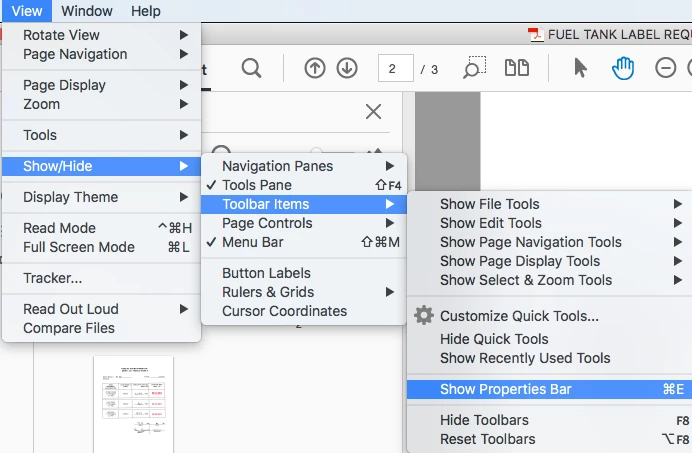
On a mac: Cmd + E. On Windows it should be Ctrl + E.

I agree that it is a pain to find. Please share your voice on this topic here: Dock Properties Bar – Share your feedback on Acrobat DC

1 Antwort

Document Geek
Community Expert
Community Expert
March 20, 2018

Is your opacity still set to 0%? The opacity applies to both fill and stroke and cannot be set independently. So if you set the opacity to 100% and use the Old Properties toolbar to set the fill to "No Fill, " that should work. Can you post a screenshot of your settings?

markf64Autor
New Participant
March 20, 2018

Thanks for replying. I saw your previous 'fix' to this by getting up the old properties toolbar and setting 'No Fill'. Problem is when I hit Cmd+Ctrl+Shift nothing happens at all – I don't get the old properties toolbar. Or anything else using that shortcut.

Is there another way I can try to get to this old properties toolbar? It sounds like it will sort my problem but I just can't access it.

Thank you.

Document Geek
Community Expert
Community Expert
March 20, 2018

On a mac: Cmd + E. On Windows it should be Ctrl + E.

I agree that it is a pain to find. Please share your voice on this topic here: Dock Properties Bar – Share your feedback on Acrobat DC