

Participating Frequently
October 30, 2015
Answered

how to enable/disable open multiple PDF in one window?

  • October 30, 2015
  • 6 replies
  • 204701 views

hi,

     I wants to disable Acrobat pro DC open multiple PDF in one windows. I tried find it form options but not successful. do you know how to do this?

Edwin

This topic has been closed for replies.
Correct answer Bernd Alheit

Same problem. I cannot find the option to enable/disable tabs for multiple documents in the preferences (German version). In my test version of Acrobat DC the tabs feature worked, in my "full-version" not.

6 replies

New Participant
January 9, 2024

go to  menu > disable new acrobat reader
then restart the app
now press ctrl+k
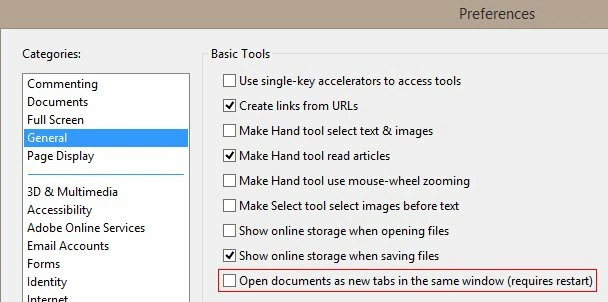
go to general > uncheck the box "open documents as new tabs in the same window"
again restart the app

New Participant
October 20, 2023

On the menu, there's an option to go back to original adobe.  Select that and you'll be good to go with your old preferences.   

New Participant
April 16, 2018

Omg, I register this forum only to answer this question since i was annoyed from this problem

That is answer

New Participant
November 30, 2020

Yeah it doesn't show the same interface as you are seeing. For me in Documents, the "Show each document in its own window" doesn't exist. I wish it did! I really want to stop auto opening all PDFs in the same window. Very annoying to not be able to adjust this setting.

Brainiac
May 10, 2017

There isn't way to add tabs to the Classic version (unless or until Adobe decide to).

Participating Frequently
November 2, 2015

I got it:

Bernd Alheit
Adobe Expert
October 30, 2015

In the preferences of Acrobat:

Participating Frequently
November 2, 2015

hi, Bernd,

     Thanks for your information. I cannot find the option which you mentioned above. I am using the latest Acrobat Pro DC. Any suggestion?

Thanks!

Participating Frequently
November 2, 2015

What version of Acrobat do you use?