


How to Export and Import Digital Signature
I apologize if this is solved somewhere else but I cannot find the answer.
I searched and found this thread: How to export signatures and preferences - Adobe Support Community - 5155363
Also this thread: Export/Import Digital Signature - Adobe Support Community - 11002921
Neither were helpful in solving the issue.
I have Adobe Acrobat DC on my Windows computer. I setup a digital signature there and want to copy it to my Acrobat Pro DC on my Macintosh laptop. I'm using version 2021.007.20091 on the Macintosh PC and 2021.007.20091 also on my Windows PC.
On the Windows PC, I created a digital signature that includes an image of my actual signature. I use this regularly to sign invoices and other forms.
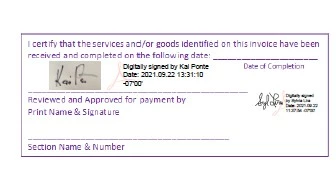
Based on instructions, I can select the signature and export it to a file on my Windows PC. I get a .fdf file. I emailed the file to my Macintosh laptop and saved it to the /Documents directory. However, I see no method for importing it. Am I missign something?
 AdChoices