
January 9, 2015
Answered

How to get PDF to auto generate new invoice number everytime it is open

  • January 9, 2015
  • 12 replies
  • 87326 views

I need a unique invoice number to show in the corner of a form.  I was thinking of the best way (maybe the easiest?) to generate a number..  I want the form when opened to automatically create this number.  In addition, one the PDF has been filled out and so on, then saved, I dont want that invoice number to regenerate once its opened again for whatever the reason.  Does this sound possible?
This topic has been closed for replies.
Correct answer try67

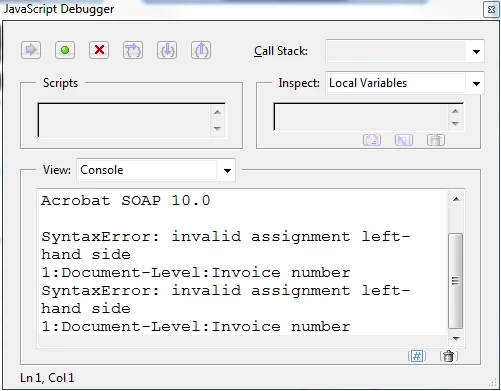
When I save and reopen a invoice number does not show. This is what (Ctrl +J) shows:

Thank you for helping me figure this out.


My bad... The code should be:

this.getField("Invoice No").value = util.printf("%06d", Math.floor((Math.random() * 1000000) + 1));

12 replies

Participant
April 30, 2024

I need help. I have been reading all the threat and I'm still not getting the pdf auto generate the number. Can someone explain me how to do it? I'm newby, but I need to create a PDF that can generate the number when its open.  Thank you in advanced!

Inspiring
September 16, 2022

I need to add unique invoice number to a form that will auto-populate the new number every time the form is saved. The number needs to be 2022-IN-20000 with the new number following as 2022-IN-20001 and so forth. Can anyone help? Thanks

Participant
September 11, 2022

hi there, 

can somebody help me to creat a new PDF Invoice Form which it will automate the invoice numbering for every new invoice. 


thanks in advance. 

Participant
May 17, 2019

Is it possible to "Lock" and "Unlock" the automatically generated invoice number? Thank you.

Participant
August 1, 2018

Hello i'm a novice when it comes using the PDF unique numbers, and the code. I have multiple log in portals that are assigned to different team members. When a member logs in I want to have a unique id populate. Will the methods that have been explained work for me in this instance or will I run into trouble since their are multiple portals utilizing the same PDF?

Once the PDF is filled out I have a submit button that will e-mail the PDF to the correct party members. At this point I want the unique number to be saved in my DB so it won't be utilized again.

Am I in over my head here, or is this something I can easily accomplish? Or would making a single portal with one user name and one password be the necessary route to accomplish the process?

Any advice and or assistance will be greatly appreciated. Thank you in advance. This article has already been extremely helpful in my form.

try67
Community Expert
Community Expert
August 1, 2018

You can use the code above to generate random invoice numbers.

You can then export the form data and import it into your DB, but you can't prevent duplicates from happening (at least not at the PDF level). However, if you use a long random number (for example, 10 digits long), the chances of that happening are minuscule.

Participant
August 2, 2018

Could I link the log in portals to start the invoice number with letters specific to the user? Example: ms-10010001 or bg-10010001 so only my numbers could be duplicated but they would still be unique since the serial has a static value?

Thank you for responding so quickly...This thread has been extremely useful for this process.

Ty3ap
Participant
April 13, 2018

I use"Fill and sign pdf forms" in my android device , what script need to use becose in this soft. Have only save buton, and when i click change original file name.(Maybe need me when save , or save as file)

Cheerful_Serenity5CF8
Participant
October 6, 2017

I entered the code, but it does not automatically change the number.  I have to go into the calculation field in the form, open/close, save and then I get a new number.  This is the code I used.

  1. this.getField("Number")=util.printf("%06d",Math.floor((Math.random()*500)+1));
try67
Community Expert
Community Expert
October 6, 2017

You should not use the code as a calculation script, but as a doc-level script.

Cheerful_Serenity5CF8
Participant
October 6, 2017

I tried it there too. Still does not auto populate the numbers.

chrism53001470
Participating Frequently
February 28, 2017

Thank you very much try67 you have saved me many many hours (or milliseconds).

AndrewCollingwood
Participating Frequently
December 1, 2015

Hey all

I am novice when it comes to adobe so hopefully someone can help me out.  Try67 already got me most of the way with his help and thank you for that but I need one last fix.  I have used this code this.getField("INVOICE").value = Number(this.getField("INVOICE").value) + 1; to make my invoice numbers go up by one every time I open it and it works great.  Now I have the problem of when I save as and rename the invoice to lets say 1001 I want that one to lock but as of now when I open 1001 it adds another number to it and changes it to 1002.  I was hoping that the original pdf will add by one but any copies will be locked down.  I have no idea how to define that.  Any help would be appreciated.

Andy

try67
Community Expert
Community Expert
December 1, 2015

You need to clearly define the conditions under which the field should update, and when it shouldn't.

AndrewCollingwood
Participating Frequently
December 1, 2015

I know I need to do that but where do I do that and how is my question.  I do not have very much experience in adobe products and I am trying my best to figure things out but I am not finding much information on this other then this thread.  I am assuming that I need to add something into the document actions area but I am not sure what to write.  I would like it to save and lock the invoice number

leslies51990429
Participating Frequently
June 18, 2015

Hi try67! This feed has been incredibly helpful. How would I modify the script below to make it start at 00000 or 00001 (it's currently starting at 837729)

  1. var v = +this.getField("Counter").valueAsString; 
  2. this.getField("Counter").value = util.printf("%06d", (v+1));

What I'm trying to do is create a root form with auto-updating work order numbers, that can be saved as separate files, while the root form still increases with each use. If I save the root form after modifying it, then when I open it the next time, the number increases. But if I save it as a separate file, the root form number doesn't change the next time I open it. Is this possible?

try67
Community Expert
Community Expert
June 18, 2015

Just clear the value of the field (or set it to "0") and it will continue from there...

If you don't want the number to change you need to edit the file and remove the script, or flatten the form fields (but then the script will produce an error message), or define some kind of condition as to when the value needs to be incremented and when it shouldn't be.

leslies51990429
Participating Frequently
June 18, 2015

Well that was just too easy. Thank you for your help with this!