


How to get PDF Tool Compare images visually?
IMHO non-visible content is irrelevant when purpose of a PDF is for print and view but, please correct me if wrong, non-visible content is included in Compare Tool from Adobe DC and/or Pro with Conversion Setting of "High Quality Print".
I have two PDFs with images which are exported from same Slide but Compare Reported "Image Replaced". Since they are same visually, I am inclined to conclude they are the same when these PDFs are to be used for view and print.
I need help with Adobe to confirm my visual check of images are identical; software for visual check exist but not yet allocated to my work resource.
With Windows 10 Enterprise, I have done the following to prove they are identical
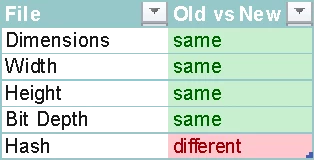
Two PDFs visually identical in content but different otherwise are acceptable in my case.
How to move forward to clarify if content is not the problem with "Image Replaced"?
 AdChoices