


Inspiring
May 26, 2020
Answered

How to hide highlighted area of editable field in PDF?

  • May 26, 2020
  • 2 replies
  • 6618 views

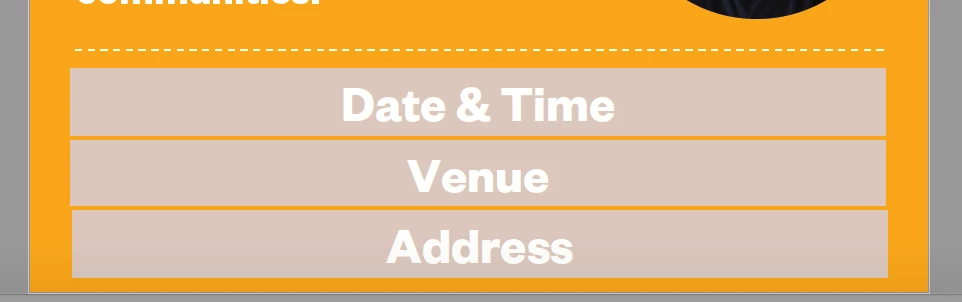
I have created a PDF and inserted editable fields, but when I save and send it to the client the highlighted box is still shown (as seen below). Can I just show the text (Date & Time etc) in the editable field without having the faded gray highlighted field?
 

This topic has been closed for replies.
Correct answer Thom Parker

Acrobat automatically highlights field so the user knows where they are. You can turn this off in your fields by adding this code to a document script.


app.runtimeHighlight = false;


2 replies

Participant
August 18, 2020

This is great! But I found it doesn't work if the pdf is opened up in Microsoft Teams, or in a browser. Any ideas in these use cases?

Thom Parker
Community Expert
Community Expert
August 18, 2020

The solutions presented hear are implemented in Acrobat JavaScript. While the script is a simple one liner, the minimum bar for this techniqe to operate in any PDF viewer, is that the viewer runs JavaScript, and that the scripting it will run includes the particlar objects and properties used in the script. Sadly, only a few good viewers actually implement the Acrobat Model, and only a few of these implement the complete model. 


The only solution for making a document equally usable in all viewers is to not include interactive features,i.e., scripts and form fields. Obviously, this isn't a tenable solution, and while it sounds bleak, there is another solution. Force the user to open the PDF in a compliant viewer.  Cover the page content with something, it could an annotation, form field, or OCG layer. This cover should tell the user to open the PDF in a decent viewer, like the free Adobe Reader. Then place code in a document script to hide the  cover.  If the cover is hidden when opened, then it's likely the viewer will run enough script to make the form usable. If the cover remains visible, then the form won't work on the vierwer and all the user sees is the message telling them how to open the PDF. 


Thom Parker - Software Developer at PDFScriptingUse the Acrobat JavaScript Reference early and often
Participant
August 18, 2020

I figured I might get frustrated by the inconsistency of viewer implementation details.

But, thanks for the suggestion to use a cover element - brilliant! I'll try to figure that one out - maybe there's a way to hide a layer?

Interestingly - and I'm using Microsoft Edge as an example - the javascript to turn off form field highlighting isn't being executed, but a calculation field that uses javascript to perform subtraction still works. So, now I'm curious, since in this case, it's not simply that Edge doesn't support javascript in the document. 
But, in support of your cover suggestion, Safari doesn't support any of the calculation fields - not standard summing fields, nor javascript subtraction. But it does turn off highlighting, and toggles it on for each field the cursor passes over, which is actually nice.

Thom Parker
Community Expert
Thom ParkerCommunity ExpertCorrect answer
Community Expert
May 27, 2020

Acrobat automatically highlights field so the user knows where they are. You can turn this off in your fields by adding this code to a document script.


app.runtimeHighlight = false;


Thom Parker - Software Developer at PDFScriptingUse the Acrobat JavaScript Reference early and often
Inspiring
June 7, 2020

Do you know if the script above is added in Indesign or in Acrobat?

Thom Parker
Community Expert
Community Expert
June 7, 2020

Not that I know of.  The code has to be added in Acrobat. 


The field highlight is a function of the user's setup. Field Highlights are turned on by default. The user can turn them off from thier preference settings, or you can put the code I posted into a document script. 

Thom Parker - Software Developer at PDFScriptingUse the Acrobat JavaScript Reference early and often