


Rach889988
Participating Frequently
April 23, 2019
Question

How to I set formula to calculate average of only filled score out of 15 fields

  • April 23, 2019
  • 5 replies
  • 7888 views

Hi guys,

I need help with finding the formula how to set the average for only fields which are only filled.

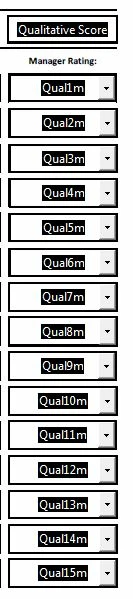
The current Quanlitative score takes in all 15 averages.

I only want fields which are filled to count the average and not including the empty fields.

I would also appreciate if you could explain how to edit the formula if i need to expand the fields in future and only to take average of those filled.
This topic has been closed for replies.

5 replies

Rach889988
Participating Frequently
April 24, 2019

Ok we have new error.  I have a checklist with checkbox field which works without any issue.  I just tried out my form and now it strangely popped up error message even tough i did not do anything on this page.

Has this to do with the javascript?

Bernd Alheit
Community Expert
Community Expert
April 24, 2019

You will get the message because "NA" is not a number.

Rach889988
Participating Frequently
April 24, 2019

Thanks, Bernd.

Are you refering to the average or the check box?

So how can i avoid this error message? 

It can get confusing for my user.

Rach889988
Participating Frequently
April 24, 2019

Hi guys

2 questions.

#1-for Qualitative Score (which you had provided with Javascript)

Strangely, it works when i have values and when there is no value. 

May I know if I am missing anything on the javascript?

the calculation (score) does not change when the field is change to empty value.

#2 for Quantitative score

I copied the same javascript, changing the "Qual" to "Quan".  It works but everytime i change the value under Quantitative fields, it will prompt this error message shown below, is there any further edit i should do to the original javascript?

***********************************************************

This is what i had copied for Quantitative Score:

***********************************************************

var nSum = 0; nCnt = 0;

for(var i=1;i<=15;i++)

{

    var nVal = this.getField("Quan" + i + "m").value;

    if(!/^\s*$/.test(nVal) && !isNaN(nVal))

    {

        nCnt++;

        nSum += nVal;

     }

}

event.value = (nCnt > 0)?nSum/nCnt:"NA";

***********************************************************

Thom Parker
Community Expert
Community Expert
April 24, 2019

Note the numbers in the loop. These exactly match the numbers of the fields.

for(var i=1 ; i<=15 ; i++)

Do not use any formatting for the fields. The error message is built into the Number format. You don't need it any way because the user is not entering numbers.

You are using Dropdown fields for the number selection? The actual value of the field does not normally change when the user makes a selection. It changes when they move the focus off the field. If you want the change to happen right away, like most people do, then you have to select the "Commit value immediately" option on the field properties dialog.

Thom Parker - Software Developer at PDFScriptingUse the Acrobat JavaScript Reference early and often
Rach889988
Participating Frequently
April 24, 2019

Hi Thom Parker

Pardon me as this is the first time i am using javascript and does not know how it works except knowing that this is a command that Adode knows what we want them to do.

For the ratings, it is a dropdown menu.  The average scoring is not dropdown (text field).

I could not find the "Commit Value Immediately" in the text field properties.  Can you please guide me?

Rach889988
Participating Frequently
April 24, 2019

Thank you both for your help.  It works!!!!!

one more question.

May I know if there is anything i should change to the javascript if i needed to reduce the number of fields from 15 to 10 or expand my fields from 15 to 20?

Thom Parker
Community Expert
Community Expert
April 23, 2019

Since your fields using a consistent naming pattern, the code can be done as a simple loop.

The code in the loop generates the field name and gets the field value. Then if it is not empty and a number, a count is incremented and the value added to the sum.

var nSum = 0; nCnt = 0;

for(var i=1;i<=15;i++)

{

    var nVal = this.getField("Qual" + i + "m").value;

    if(!/^\s*$/.test(nVal) && !isNaN(nVal))

    {

        nCnt++;

        nSum += nVal;

     }

}

var nAve = nSum/nCnt;

Thom Parker - Software Developer at PDFScriptingUse the Acrobat JavaScript Reference early and often
try67
Community Expert
Community Expert
April 23, 2019

Your code is missing assigning the final result to the event's value, as well as checking that nCnt is not 0, which would cause an error.

try67
Community Expert
Community Expert
April 23, 2019

Yes, of course. Details, Details.

var nSum = 0; nCnt = 0;

for(var i=1;i<=15;i++)

{

    var nVal = this.getField("Qual" + i + "m").value;

    if(!/^\s*$/.test(nVal) && !isNaN(nVal))

    {

        nCnt++;

        nSum += nVal;

     }

}

event.value = (nCnt > 0)?nSum/nCnt:"NA";


Yes, where the devil lies... Now it's perfect! :-)

try67
Community Expert
Community Expert
April 23, 2019

I posted code that allows you to do it. Try searching for "calcAverage" on these forums, especially the JavaScript one.