


Inspiring
November 3, 2018
Answered

How to launch a 2nd session of Acrobat when 1st one is open in the background?

  • November 3, 2018
  • 1 reply
  • 1301 views

When Acrobat has been launched, for instance by opening a PDF from Internet, or from within Outlook, I always need to close it first before I can open a 2nd PDF file.

It is not possible to launch Acrobat a 2nd time then.

It is not a big thing, just something to remember.

However, occasionally I might have forgotten that: Acrobat was launched a while back and I forgot that it was/is still running and I am then vainly trying to open another PDF file.

Is this a 'settings-matter'?

Thanks!
This topic has been closed for replies.
Correct answer Dave__M

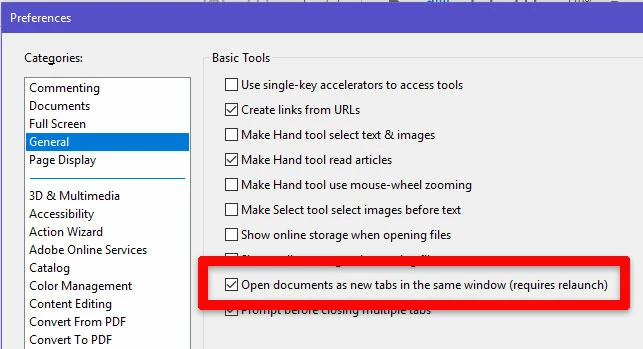
I'm not sure that this will address your issue or not, but it might be worth a try.  In Acrobat, go to Edit>Preferences, and click the General category on the left.  Then turn off the Open documents as new tabs... setting.  After restarting Acrobat, try your scenario again.  Maybe this will do the trick.

I hope this is useful.

My best,

Dave

1 reply

Dave__M
Community Expert
Dave__MCommunity ExpertCorrect answer
Community Expert
November 3, 2018

I'm not sure that this will address your issue or not, but it might be worth a try.  In Acrobat, go to Edit>Preferences, and click the General category on the left.  Then turn off the Open documents as new tabs... setting.  After restarting Acrobat, try your scenario again.  Maybe this will do the trick.

I hope this is useful.

My best,

Dave

adwul62Author
Inspiring
November 4, 2018

Hello to you,

Many  thanks!

I gave it a few tries and this indeed seems to solve the issue.

Super!

Again, many thanks for the quick response.

Best regards