



L Gryfe
Inspiring
May 25, 2019
Answered

How to make one radio button turn on another radio button

  • May 25, 2019
  • 2 replies
  • 2344 views

I am creating a form where activating a radio button in one place should activate a corresponding button elsewhere on the form. Specifically, if the user answers Yes with a radio button near the bottom of the form, a radio button in the header will indicate that they answered yes to this question. I know for text fields I can simply duplicate the field to repeat the same answer elsewhere, but I can't figure out how to do the same for a radio button.
This topic has been closed for replies.
Correct answer Bernd Alheit

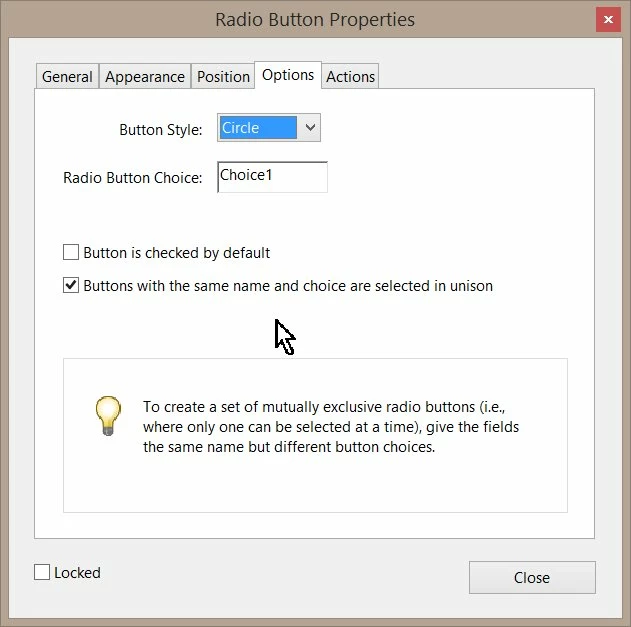
Enable following option:

2 replies

Bernd Alheit
Community Expert
Community Expert
May 26, 2019

Use radio buttons with the same name and value.

L Gryfe
L GryfeAuthor
Inspiring
May 26, 2019

Please elaborate. I tried several variations of this. If I apply the same name and group name to the "duplicate" radio button, Acrobat automatically puts it in the same group as the original button. Also, buttons with identical names within a group seem to still behave as radio buttons should (i.e., only one can be on at a time.), regardless of the fact that they share a common name.

Bernd Alheit
Community Expert
Bernd AlheitCommunity ExpertCorrect answer
Community Expert
May 26, 2019

Enable following option:

L Gryfe
L GryfeAuthor
Inspiring
May 26, 2019

I found this answer after more searching. It's not exactly what I was hoping for but it looks the same to the user so I might have to settle for it. If somebody has a more elegant answer, I'd love to hear it.