



Clare__
Participating Frequently
May 9, 2022
Answered

How to make 'Performing page recognition' for all pdf at once even if it takes some time?

  • May 9, 2022
  • 1 reply
  • 9676 views

Hello


I have a copy of Adobe Acrobat DC (the pro thing) where I can edit a pdf unlike the free version.

So I have some books (long pdf files) where naturally each would be 300 pages or more. Now these books are tilted, the scanned images are not straight, so what I do is open each page alone, then click [Edit pdf] command from the right bar. As I click it, it starts saying 'Performing page recognition' and sometimes also 'Converting texts..etc'


So after that is done, automatically if the page is a little tilted it gets back straight as it has to be.

I had even been using this when I scan papers tilted at work. I just open that created folder of scan, click edit, and all done 🙂


Now the thing is, when I am doing this for a book, I have to go to each page to click edit at, so it could be recognised, and it takes 5-8 seconds usually for each page. And I am also moving the whole text in each page to the middle, as some pages have the text more towards either side. So I select it all then move it to the middle.


So waiting 5-8 seconds for each page is annoying and wasting my time.

Now I remember that I once dealt with a pdf before with edit, and surfed through several pages while [edit] was still on, and all of them were recognised but took a little time. Now I am trying to do so again, but I seem to fail or forgot the way I did it last time. Is there any idea of how can I get to make the program perform page recognition on all pages, even if it would take me some time.


As it is doing so, I 'll be performing another task elsewhere. So all would be fine.


I hope my enquiry is clear, and looking forward for your contributions.

Regards.
This topic has been closed for replies.
Correct answer gary_sc

Hi Clare,


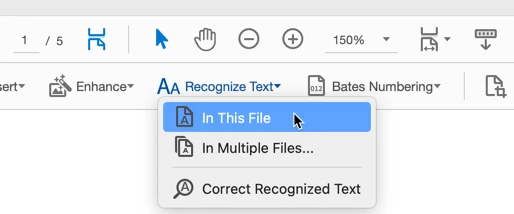
You're clicking on the Edit tool. You'll get what you want if you click on the Scan and OCR tool. You'll see the option to click on here:

The one thing to warn you about is that Acrobat will interrupt you every page it processes. So, plan on going out to lunch or something that will take some time because until Acrobat is done on this process, you cannot get any work done on your computer. Even reading emails will become impossible.


Good luck!


1 reply

gary_sc
Community Expert
gary_scCommunity ExpertCorrect answer
Community Expert
May 9, 2022

Hi Clare,


You're clicking on the Edit tool. You'll get what you want if you click on the Scan and OCR tool. You'll see the option to click on here:

The one thing to warn you about is that Acrobat will interrupt you every page it processes. So, plan on going out to lunch or something that will take some time because until Acrobat is done on this process, you cannot get any work done on your computer. Even reading emails will become impossible.


Good luck!


Clare__
Clare__Author
Participating Frequently
May 9, 2022

Sure. Thanks, I'll check it out.


And yes I know it does interrupt in every page. And I have prepared some other activities where I'm assuming my PC won't be available overall during this time.


Clare__
Clare__Author
Participating Frequently
May 9, 2022

I don't know if I can edit my reply, can't find an option and that's why I'm replying on myself.


It seems I have an old version of it, but yes I found it as 'Settings' under [Scanning Documents], it opened a box and one of the choices was "Make all pdf pages editable" and yes it it going through each page from 1 till the end, I'll see how this ends but it is working anyway. Many thanks !! :))