


How to manually override a calculation fillable forms
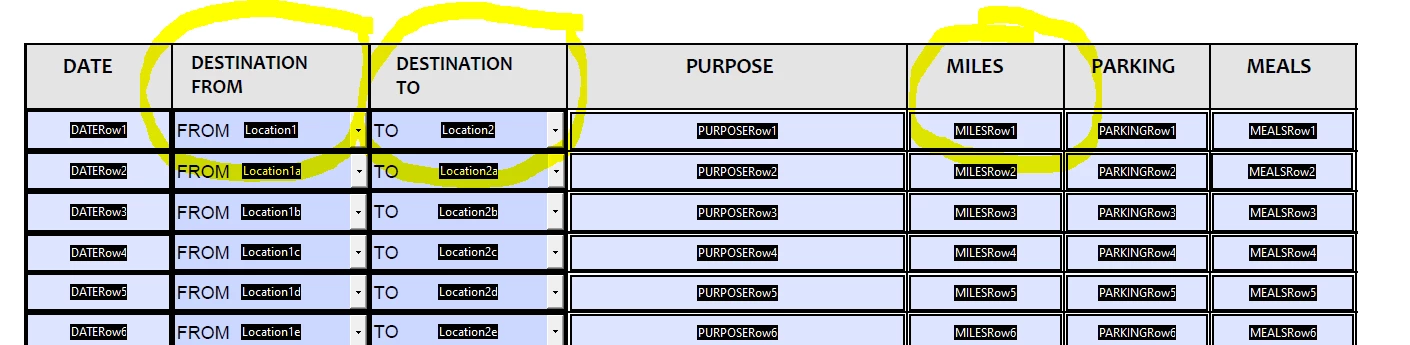
I can auto-calculate the miles in my fillable form using the table and script below. However, I want them to be able to select an "other" as an option in the drop-downs (putting an explanation in the purpose column) so they can manually input their own miles in the miles column. How can I do that?
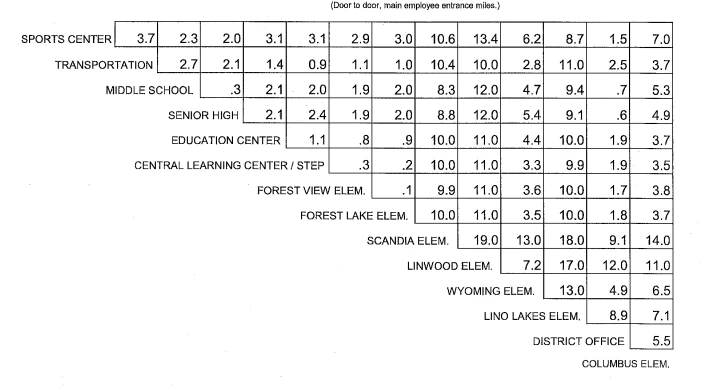
var Loc1=this.getField("Location1").value;
var Loc2=this.getField("Location2").value;
if((Loc1=="Sports Center" && Loc2=="Transportation")||(Loc1=="Transportation" && Loc2=="Sports Center"))
{event.value=3.7} else
if((Loc1=="Sports Center" && Loc2=="Middle School")||(Loc1=="Middle School" && Loc2=="Sports Center"))
{event.value=2.3} else
if((Loc1=="Sports Center" && Loc2=="Senior High")||(Loc1=="Senior High" && Loc2=="Sports Center"))
{event.value=2.0} else
if((Loc1=="Sports Center" && Loc2=="Education Center")||(Loc1=="Senior High" && Loc2=="Sports Center"))
{event.value=3.1} else
if((Loc1=="Sports Center" && Loc2=="Central Learning Center/STEP")||(Loc1=="Central Learning Center/STEP" && Loc2=="Sports Center"))
{event.value=3.1} else
etc...
 AdChoices