


Known Participant
February 24, 2019
Answered

how to populate drop down list based on multiple text box entries
  • February 24, 2019
  • 5 replies
  • 17148 views

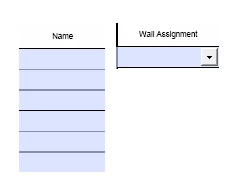
hi, i'm having problem on how to auto-populate the drop down list (Wall Assignment) based on the Text box fields (Name). I am using Adobe Acrobat Pro Dc.

The table with Name column is from page 2, while the Wall Assignment drop down, is on page 3.

Whenever the user enters a Name, it will auto-populate the Wall Assignment list.

i saw some post that uses addItems and setItems, but still don't know what to use and where to insert the code. is it on the textbox using keystroke or action javascript, or on the drop down field.

thanks

This topic has been closed for replies.
Correct answer Thom Parker

what should i add to the line of code so that all the items in the dropdown list will be selectable? thanks


All items in the dropdown are selectable. That is not the problem.

The issue is that this script is a calculation. The script is run anytime any field on the form changes.

There are 3 solutions:

1)  Change the script to a validation script on the "LstGrp" text fields

2)  Qualify the calculation by testing the source of the event. In this case it should be one of the "LstGrp" fields

3)  (poor solution) Save the value of the list before changing the list items, then set it.

I think #2 is the best one since it blocks unnecessary updates and only changes code in one location.

Put the code in this if statement

if(/^LstGrp/.test(event.source.name))

{

    .. The script...

}

5 replies

New Participant
August 13, 2020

Hey Thom,  I know this is an old string, but your guidance saved me today - thanks for sharing your expertise.  

iammundAuthor
Known Participant
February 28, 2019

thanks for the codes, i used this one so that the dropdown will also clear/reset whenever the textboxes are cleared

//populate dropdown based on multiple textbox

var aValues = this.getField("LstGrp").getArray().map(function(a){return a.valueAsString;});

var aList = aValues.filter(function(a){return (a.length > 0);});

event.target.setItems([" "].concat(aList));

iammundAuthor
Known Participant
February 26, 2019

cool, will try that. thanks

another question, i have a two dropdown list. the entries on the second dropdown will depend on the item selected on the first dropdown.

example entries below:

dropdown1 - A, B, C, D

dropdown2 - 1, 2, 3, 4

if dropdown1 selects A, dropdown2 will have still 4 entries.

if dropdown1 selects B, dropdown2 will only have 1, 2 as entries.

if user selects blank or the form is reset, the entries on dropdown2 will be back at default.

how can I change the entries on dropdown2 based on the selection on dropdown1?

thanks

Thom Parker
Adobe Expert
February 26, 2019

For this you'll need to use the custom keystroke event on dropdown1, And all dropdowns need to have the "commit selection immediately" option set.

if(event.willCommit)

{

     switch(event.value)

      {

          case "A":

               this.getField("dropdown2").setItems(.. list of items...);

               break;

          case "B":

               this.getField("dropdown2").setItems(.. list of items...);

               break;

      }

}

Handling the form reset is a bit different. You'll need to put code on the reset button to set the list to the default set of items.

Thom Parker - Software Developer at PDFScriptingUse the Acrobat JavaScript Reference early and often
iammundAuthor
Known Participant
February 27, 2019

will try these codes later.

thanks for the patience

iammundAuthor
Known Participant
February 25, 2019

George_Johnson

can you help me on this one? thanks

Thom Parker
Adobe Expert
February 24, 2019

Here's a tutorial that covers adding and deleting items from a list. And there is an example file.

https://acrobatusers.com/tutorials/list_and_combo_in_lc

Thom Parker - Software Developer at PDFScriptingUse the Acrobat JavaScript Reference early and often
iammundAuthor
Known Participant
February 24, 2019

hi, i already saw this example and there's no drop down list in the sample pdf form.

do you have a simple code where in I can populate a drop down list after I enter some text in the textbox?

i only know how to populate a text box field using a drop down list. but I don't know how to populate a drop down.

thanks

Thom Parker
Thom ParkerCorrect answer
Adobe Expert
February 28, 2019

what should i add to the line of code so that all the items in the dropdown list will be selectable? thanks


All items in the dropdown are selectable. That is not the problem.

The issue is that this script is a calculation. The script is run anytime any field on the form changes.

There are 3 solutions:

1)  Change the script to a validation script on the "LstGrp" text fields

2)  Qualify the calculation by testing the source of the event. In this case it should be one of the "LstGrp" fields

3)  (poor solution) Save the value of the list before changing the list items, then set it.

I think #2 is the best one since it blocks unnecessary updates and only changes code in one location.

Put the code in this if statement

if(/^LstGrp/.test(event.source.name))

{

    .. The script...

}

Thom Parker - Software Developer at PDFScriptingUse the Acrobat JavaScript Reference early and often