



Alyda-W
Participating Frequently
June 14, 2024
Answered

How to pre-populate multiple columns from an item selected in a dropdown list.

  • June 14, 2024
  • 2 replies
  • 528 views

I have a form, that I want to create so that when a user selects an item from a drop down list, I want adobe to pre populate the following columns based on a list of information... for example:

(PDF FORM AT THE TOP > EXCEL LIST UNDERNEATH)
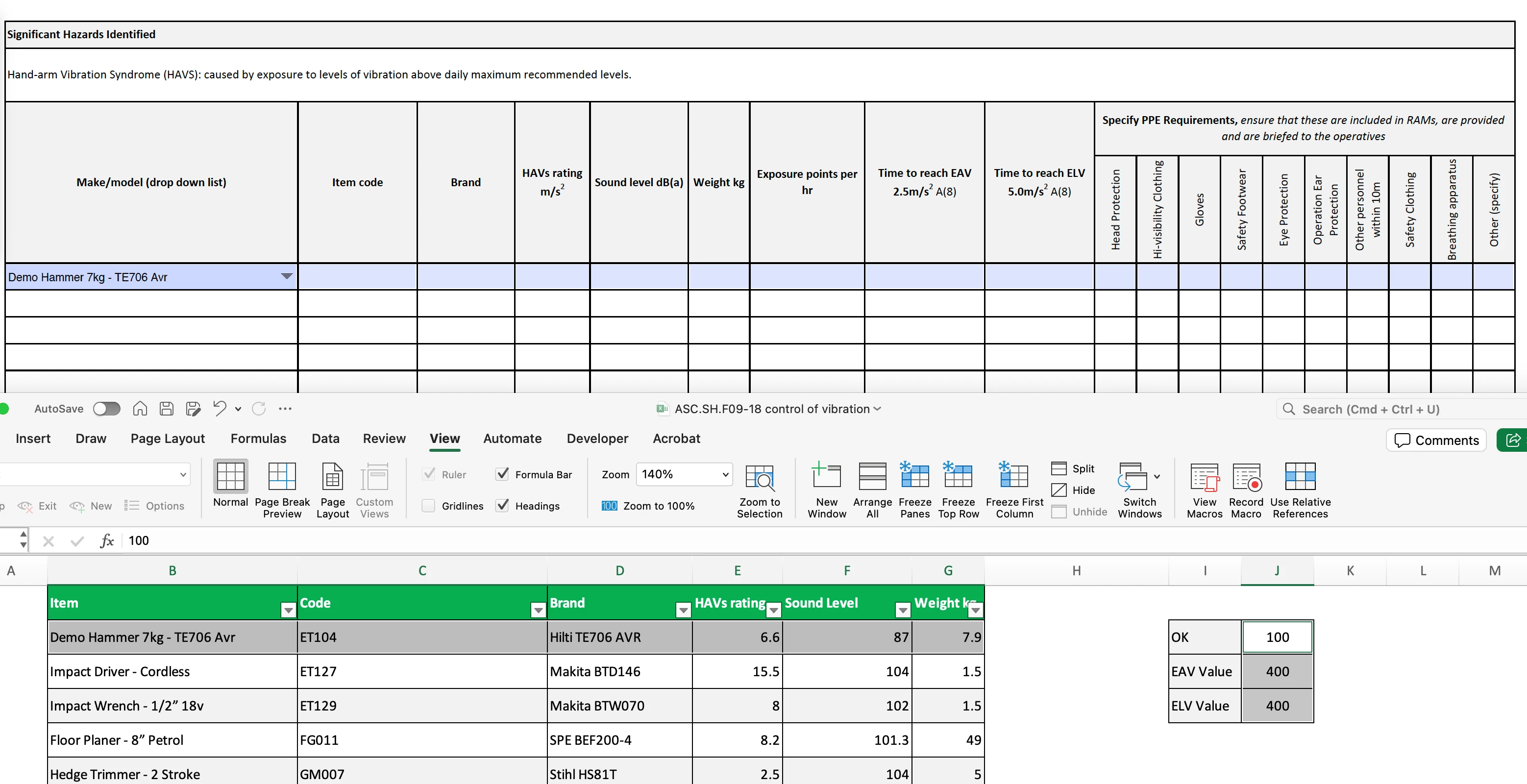


Does anyone have any advice on how I can do this?


This topic has been closed for replies.
Correct answer try67

If you have a spreadsheet full of data it's best to keep using it, in my experience.

You can do that if you converted the Excel file to a plain-text file (such as a csv or tab-delimited txt file), and then used a script to read that data and populate the fields based on the selection in the drop-down.

You can achieve that using this (paid-for) tool I've developed: https://www.try67.com/tool/acrobat-populate-fields-from-dropdown


2 replies

try67
try67Correct answer
Community Expert
June 14, 2024

If you have a spreadsheet full of data it's best to keep using it, in my experience.

You can do that if you converted the Excel file to a plain-text file (such as a csv or tab-delimited txt file), and then used a script to read that data and populate the fields based on the selection in the drop-down.

You can achieve that using this (paid-for) tool I've developed: https://www.try67.com/tool/acrobat-populate-fields-from-dropdown


PDF Automation Station
Community Expert
June 14, 2024

Create a list of corresponding values and separate them with a separator.  For example:  ET104--Hilti TE706 AVR--6.6--87--7.9 would be the value for the dropdown entry Demo Hammer 7kg - TE706 Avr, using -- as the separator.  Then enter the lists as the export values of the dropdowns for each corresponding entry.  Then split the value of the dropdown in a custom calculation like this:

event.value=this.getField("Dropdown").value.split("--")[0]; //first field related to the dropdown

event.value=this.getField("Dropdown").value.split("--")[1]; //second field related to the dropdown, etc.

Select "Commit selected value immediately" in the options tab of the dropdown.  There are a lot of shorcuts you can use to build this quickly, including writing some of the code in Excel, and using this dropdown filler (paid for) tool I developed.