melissaibjs
New Participant
February 6, 2018
Answered

how to preserve embedded object when converting from word 2016

  • February 6, 2018
  • 2 replies
  • 149688 views

I'm trying to convert a word document (2016) containing embedded object to pdf. The embedded object won't open in pdf. The icon becomes an image.

I've tried different methods in converting the word document to pdf :

1. File - Save As - PDF (*.pdf)

2. File - Save as Adobe PDF

3. File - Print - Adobe PDF

4. File - Export - Create Adobe PDF

5. File - Export - Create PDF/XPS Document

6. ACROBAT ribbon - Create PDF (already set the preferences - tried every combination of checked selections under PDFMaker Settings and Application Settings)

None of the above steps work. I tried searching my inquiry from the existing forum as well as advanced search but no luck. I tried Google and Microsoft Office help but couldn't find the answer. I need clear step by step instructions (if possible with screenshots)
This topic has been closed for replies.
Correct answer Adorobat

Hi Melissaibjs,

Sorry for the delayed response.

Please refer to the following forum threads discussing the similar topic:

How do you keep embedded documents during conversion from Word 2007 to PDF?

Open embedded files in PDF doc

You may try adding an attachment in Acrobat and check if that works for you.

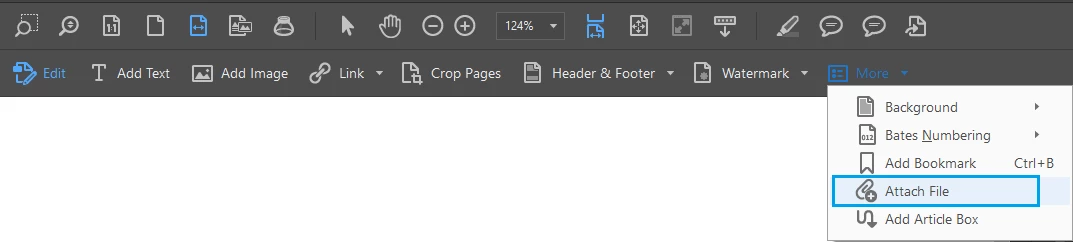
Launch Acrobat > click Tools > Edit PDF > More > Attach File.

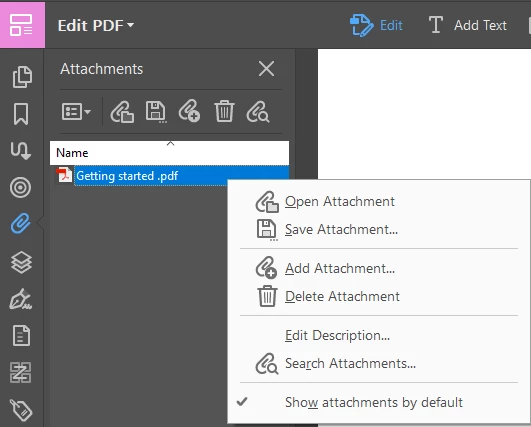
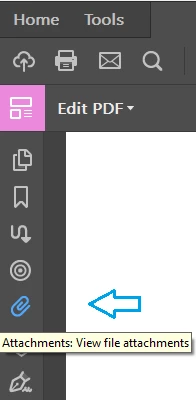
Once attached, click on the attachment icon in the left-hand pane to see the attachment:

You may also visit the following link which explains more about: Links and attachments in PDFs, Adobe Acrobat

Feel free to update this discussion if you need any further help.

Shivam

2 replies

Adorobat
Community Manager
AdorobatCommunity ManagerCorrect answer
Community Manager
April 9, 2018

Hi Melissaibjs,

Sorry for the delayed response.

Please refer to the following forum threads discussing the similar topic:

How do you keep embedded documents during conversion from Word 2007 to PDF?

Open embedded files in PDF doc

You may try adding an attachment in Acrobat and check if that works for you.

Launch Acrobat > click Tools > Edit PDF > More > Attach File.

Once attached, click on the attachment icon in the left-hand pane to see the attachment:

You may also visit the following link which explains more about: Links and attachments in PDFs, Adobe Acrobat

Feel free to update this discussion if you need any further help.

Shivam

Brainiac
February 6, 2018

Have you found anything to suggest it should work? Where?