


New Participant
August 15, 2022
Answered

How to prevent text boxes from being separated after saving?

  • August 15, 2022
  • 4 replies
  • 9498 views

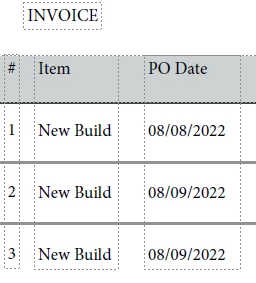
I am making an invoice, and to make it very easy to edit when I come back to it, I set up the text boxes on a column, with multiple new lines in between them, however when I save the PDF it splits the single text boxes into multiple text boxes, making it more difficult to edit them.

Before saving:
After Saving:
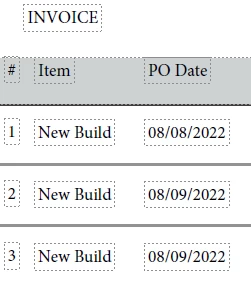
Is there some setting I can change to stop this from happening? I want the PDFs to be saved in the way that they were created.


Correct answer Thom Parker

This is an inappropiate use of Acrobat and PDF. A PDF is not a word document. The content is not meant to be edited. 

To solve this issue, use form fields where data needs to be entered. 


4 replies

New Participant
October 29, 2024

I am currently looking at this issue. I work in a CPA firm. We scan all of our client documents into PDFs because we are going completely digital.  But we need to mark up documents. I currently create a text box to show what numbers were added together (RIP PDFlyer).  I save it as one big text box. I need to go back in and edit the box, or just move it down. Now it is many small boxes, which must be moved individually - creating a waste of time and formatting as it is nearly impossible to align them all up again.   I am not actually editting PDFs - I am trying to edit my note/textbox.  I can't go back to Word or source document.  We are going digital (working remotely and completely in  the cloud) so physically writing on a paper document and scanning on the tail end isn't possible.

Thom Parker
Community Expert
October 29, 2024

The correct way to do this is to add a text markup annotation, Not to edit the page content. 

There are ways to automate this process.  I've written tools that automatically adds numbers that have been circled and place a stamp or text box on the PDF next to the numbers. 

For example:

https://www.pdfscripting.com/public/Paper-Tape-Calculator-Description.cfm


Thom Parker - Software Developer at PDFScriptingUse the Acrobat JavaScript Reference early and often
New Participant
October 17, 2023

I have to admit, Acrobat changing the text format after saving the file is rather exasperating. I am creating a fillable form, and have to recreate a PDF using just Acrobat. I don't understand why there isn't an option to disable this from happening.

Thom Parker
Community Expert
October 17, 2023

Why do you have to recreate the PDF using just Acrobat? Acrobat is not a content creation tool, so it is not appropiate for this purpose.


Thom Parker - Software Developer at PDFScriptingUse the Acrobat JavaScript Reference early and often
Brainiac
August 15, 2022

Or, make the invoice in Word. There's nothing to be gained at all by struggling to make it in Acrobat. You can use Acrobat or Word to convert your Word document to PDF in seconds - but never edit the PDF. Keep re-editing the Word document.

Thom Parker
Thom ParkerCorrect answer
Community Expert
August 15, 2022

This is an inappropiate use of Acrobat and PDF. A PDF is not a word document. The content is not meant to be edited. 

To solve this issue, use form fields where data needs to be entered. 


Thom Parker - Software Developer at PDFScriptingUse the Acrobat JavaScript Reference early and often
New Participant
October 16, 2022

This isn't a helpful response.  I have the same question, but I'm NOT using Acrobat to create invoices.

New Participant
July 24, 2024

Acrobat Pro is not a document editing tool. Where do you see that it is marketed as such? 

It is a document viewing, processing, and finishing tool. 

Content editing is a task for word processors and layout tools. These are all separate things. 


I would say Adobe does market Acrobat Pro as being very useful for editing PDFs, especially the flow of text. There is a simple way that so far I have seen it maintain the whitespace. Any empty line, just put in a single space. I believe you will need to also put one after the last lines of text as, there is the possibility it splits the last couple lines of text into their own boxes.