


New Participant
June 19, 2020
Answered

How to remove pixelated background on Adobe Acrobat Pro

  • June 19, 2020
  • 2 replies
  • 4283 views

Hi All, I accidentally pressed some random keys on my keyboard while I had a PDF document open, since then all documents I open in Adobe Acrobat Pro has this checkerboard pixelated background (please see image uploaded) which makes the document very difficult to read. Please advise how to remove this checkerboard pixelated background, thanks!   
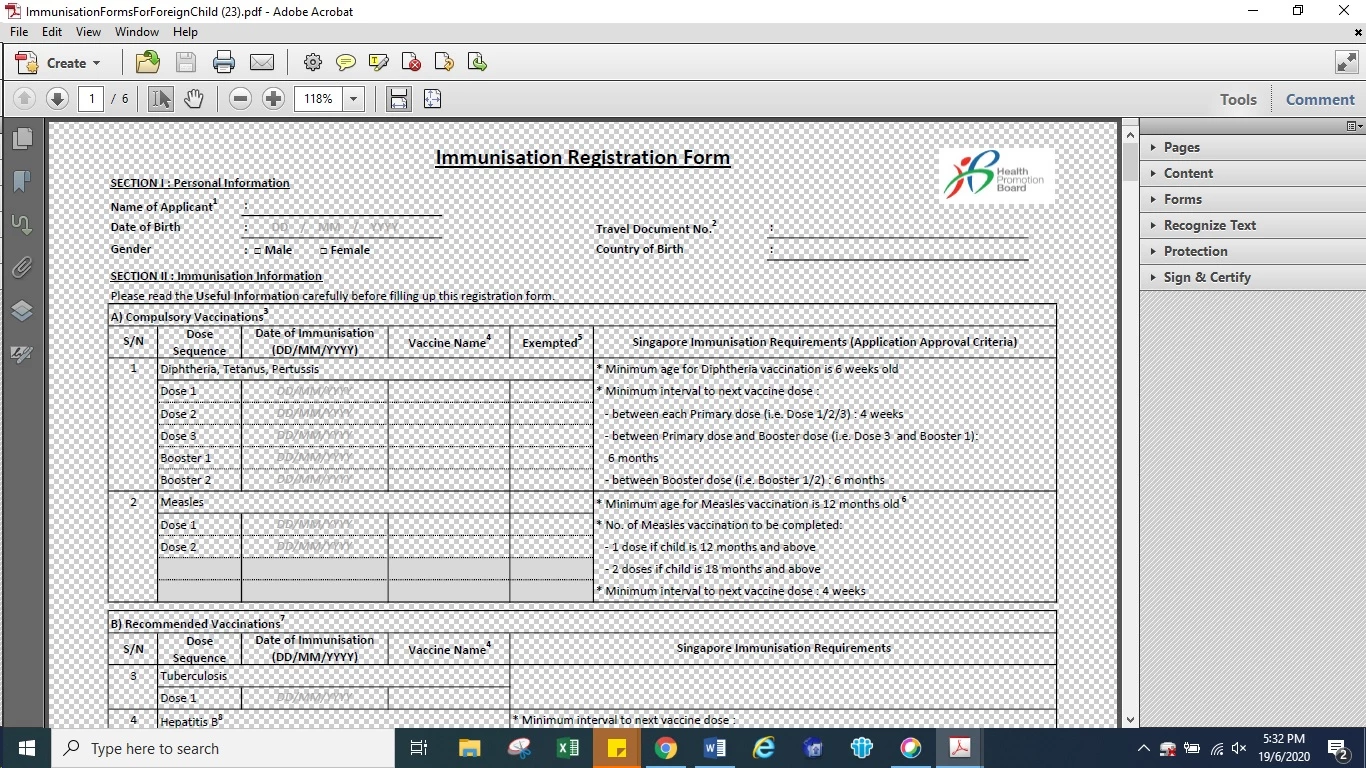
Correct answer @mj

Hi melcircus,


Your transparency grid view is enabled.


To switch this off do the following:

  1. Choose Edit Menu > Preferences
  2. Choose Page Display under Categories on the left of the dialog
  3. Uncheck Show transparency grid


hth

.mj


2 replies

New Participant
August 11, 2021

Thank you for asking this questions.

Happened to me some time ago and I have been searching help ever since.

Today your question appeared and my issue is resolved.

Toni 🙂

try67
Community Expert
August 11, 2021

You can also use Ctrl+U to enable/disable it.

try67
Community Expert
August 11, 2021

Sorry, that's wrong. That's the regular grid, not the transparency grid...

@mj
@mjCorrect answer
Community Expert
June 19, 2020

Hi melcircus,


Your transparency grid view is enabled.


To switch this off do the following:

  1. Choose Edit Menu > Preferences
  2. Choose Page Display under Categories on the left of the dialog
  3. Uncheck Show transparency grid


hth

.mj


melcircusAuthor
New Participant
June 19, 2020

Hi .mj just tried this and it worked, thanks so much for your help!! :))