


Participant
April 1, 2024
Answered

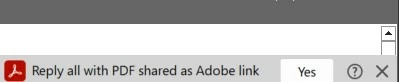
how to remove popup from outlook "Reply all with PDF shared as Adobe Link"

  • April 1, 2024
  • 3 replies
  • 4341 views

everytime i go into an email on outlook I get that notification on the side and it won't let me exit out of it (it blocks part of the message.  How can i get rid of it without removing adobe from outlook?
Correct answer Kara23756662w2vh
You turn it off like this:
  1. Click File on the Outlook menu.
  2. Click Options on the File menu.
  3. Click Add-ins.
  4. Select COM Add-ins from the Manage drop-down.
  5. Click Go.
  6. Deselect Adobe Document Cloud for Microsoft Outlook - Acrobat.
  7. Click OK.

3 replies

Participant
December 5, 2024

THANK YOU!  That was so annoying.  Finally its gone.  

Kara23756662w2vhCorrect answer
Participant
April 10, 2024
You turn it off like this:
  1. Click File on the Outlook menu.
  2. Click Options on the File menu.
  3. Click Add-ins.
  4. Select COM Add-ins from the Manage drop-down.
  5. Click Go.
  6. Deselect Adobe Document Cloud for Microsoft Outlook - Acrobat.
  7. Click OK.
Participant
April 11, 2024

Thank you!!!   That pop-up became one of the biggest, most useless and intrusive things in the history of anything.  Almost worse than PowerPoint's design-idea suggestor.

Participant
April 3, 2024

Where is the answer to this it is making email unreadable. What is wrong with Adobe they have become useless from once being great.