


Participant
March 16, 2022
Answered

How to share pdf file by email as attachment and NOT with adobe itself?

  • March 16, 2022
  • 3 replies
  • 17505 views

I want to share a pdf by email, as an attached file, but the adobe software forces me to share the pdf file by document cloud. 

When I have the pdf file open and I click File, Share File, the only sharing option is thorugh the adobe cloud or something. I just want to share the file by email, as an attachment. Is it too much to ask? How can I do that direclty from the pdf file itself? As preview and other softwares do. 

It is so annoying when a software forces you to use it even if you dont want to. If it was good, there was no need to force users to use it. 
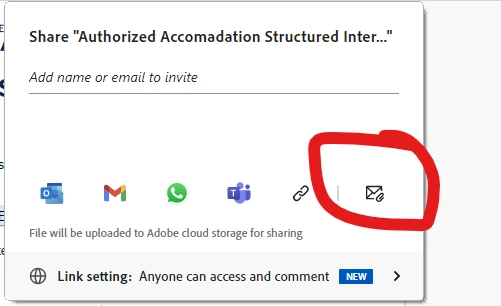
 

Correct answer Nikki5D9D

This button worked for me.

3 replies

Amal.
Community Manager
Community Manager
March 16, 2022

++ Adding to the suggestion by Bernd Alheit


Please toggle off the button to 'Attach a link' as shown below:


Let us know if you experience any trouble and need more help.


Regards

Amal

Participant
April 17, 2023

Is there not a way to have it disabled by default as an account preference? 

Meenakshi Negi
Community Manager
Community Manager
April 17, 2023

Hi Jessica27589458cjcm,


To send the PDF as an email attachment by default, disable the "Send link in attach to email (Sign-in required)" option in Acrobat Preferences.

Go to Edit > Preferences >  Email accounts in Acrobat or Acrobat Reader on a Windows machine. For Mac, Application Preferences > Email accounts.

Refer to the screenshot attached below:


Thanks,

Meenakshi


Marking a reply or response “Correct” will help future users with the same issue quickly identify the correct answer.

try67
Community Expert
Community Expert
March 16, 2022
Bernd Alheit
Community Expert
Community Expert
March 16, 2022

Disable the option send as link.