


New Participant
June 2, 2012
Answered

How to spell check a PDF file (2012)

  • June 2, 2012
  • 7 replies
  • 243409 views

I like to have the ability to spell check a PDF file. For the most part what I see is that some Adobe products allow spell checking while inputting into a  field. I want the main file to be checked. (I produce my PDF files from a TeX document and so this is a second check past the editor of TeX. The presence of code in the TeX document makes it occasionally hard to see the errors.)


Is the best alternative to convert to WORD and check the document there?


And while on the topic is there is homonym checker? As in flagging there, their, they're.
Correct answer try67

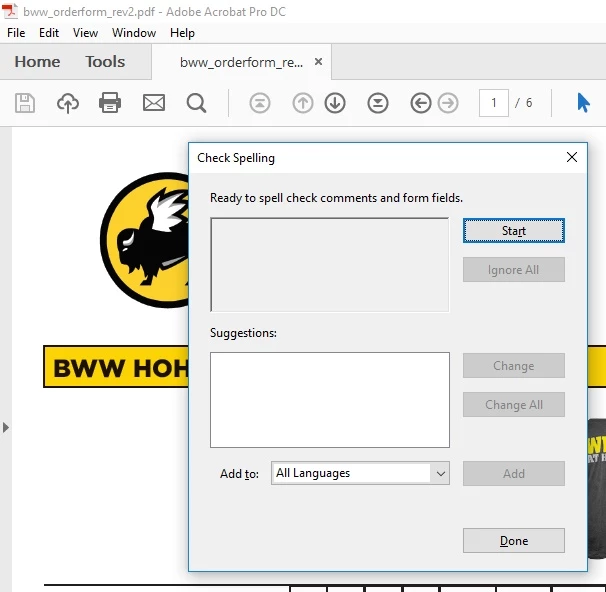
Using an opened document in Acrobat press the F& key to bring up the Spell Check AdId in window.


But that only works for form fields and comments, as is mentioned in the dialog window...

7 replies

New Participant
September 15, 2023

This post is ancient but... You can always export to word and check there. Depending on the formatting, you may have varying levels of success. 

Ironically, Chome is not seeing my spelling errors in this forum either. 

New Participant
September 15, 2023

My Adobe Acrobat Reader doesn't have an (active) option to export to Word, and if I open the document in Chrome, I don't see an export to Word option either. Can you give us the steps to do this export function in one of the two apps.

Dave Creamer of IDEAS
Community Expert
Community Expert
September 15, 2023

Depending on your version, You should see a Convert to Word, Excel, or PowerPoint menu under the File menu or the menu button (aka hamburger icon). 


Don't view in Chrome--the option is not there. Download and open in the Reader directly.  


David Creamer: Community Expert (ACI and ACE 1995-2023)
davidt1946204
New Participant
June 14, 2023

How is it possible in this day and age Adobe doesn't have a built-in spell checker? Dave Merchant's reply is idiotic. How about some common sense?

Dave Creamer of IDEAS
Community Expert
Community Expert
June 14, 2023

But the reply is accurate. No need to be rude--99% of the people here do not work for Adobe and are users just like you. But instead of  posting useless, rude responses, they are trying to help others. 


The spell checking should happen in the original program before it ever becomes a PDF. 

David Creamer: Community Expert (ACI and ACE 1995-2023)
New Participant
November 22, 2021

I think you misunderstand the purpose of PDF documents.  PDF stands for Portable Document Format.  It was designed to portray a document as you intended it to be printed.  Rather than printing and mailing the document, PDF format allows you to electronically send that document so it is independent of the application that created it.  As such, it is expected that the original application that created the document will have its own spell checker.


https://www.adobe.com/acrobat/about-adobe-pdf.html


Even with Pro versions of Acrobat, there are still only a limited number of ways to actually edit the text.

New Participant
November 22, 2021

I think most of PDF document user understand the purpose of PDF documents. The problem is not when you are the document creator but when you receive the document in pdf format and one of the duties is to verify if its spelling and maybe grammar is correct. In my case this happens when for example I have to review conference papers that are submitted or uploaded in pdf format. It is not that I can't do it manually, but it is faster when the spell and grammar checkers are highlighting these kind of errors for me so I can concentrate more on the scientific content of the paper. 

New Participant
March 14, 2020

Another possibility is saving the PDF document using Save As Text and then spellchecking the txt file.

New Participant
March 5, 2021

You could try libre office draw.

New Participant
June 9, 2017

This would be nice I agree. When reviewing someone else's PDF it would be a great first no-brainer step.

NotEvenCloseToAlmostDone
New Participant
July 29, 2015

Converting to Word is sometimes problematic for me, not sure why -- so today I'm trying something new:

In Acrobat (the "About" thing says my copy is Acrobat Pro DC Version 2015.008.20082), under Preferences > Commenting > Making Comments, I checked the boxes for "Copy encircled text into Drawing comment pop-ups" & "Copy selected text into Highlight, Strikethrough, and Underline comment pop-ups."

Then I reduced the viewing size of the PDF to 50% (it's unreadable, but that doesn't matter), and then —

Having decided to use the Draw Rectangle tool, I'm drawing a big box around a whole page of text, or as much of a page as I can, and then doing the "Edit => Check Spelling => In Fields, Comment, Editable Text" thing.


It seems to be working faster than Word has, for me. (I get a lot of mangled text when I convert to Word.) And I hope the dictionary is pretty darn good.


I'll still read the entire PDF word for word, and in some places letter for letter, but I do need a spell-check backup, because after a few pages of very close reading my eyes get tired. Acrobat isn't always a lot of fun for editors/proofreaders, but it helps me earn my living, and it's a lot easier to use than it was a few years ago.


Will let you know in a couple weeks if this is working for me.

Legend
June 3, 2012

PDF is not designed to be an editable file format, so it doesn't make sense to have a spelling or grammar checker for the page content itself. We have spellcheckers for form fields and comments, but checking the static page content is the job of whichever application you used to create the PDF in the first place.

New Participant
September 11, 2014

Yes but what if the pdf file was generated automatically by another application based on data input into several fields? This is my issue. I have no way to spell check within the application and I don't know how to check the pdf output.

Inspiring
January 7, 2015

Press the F7 key or use "Edit => Check Spelling => In Fields, Comment, Editable Text"