

Participating Frequently
October 11, 2023
Answered

How to stop Adobe from opening automatically after printing to PDF

  • October 11, 2023
  • 1 reply
  • 27618 views

Every time I "print to PDF" from anywhere, the document automatically opens in Adobe. How do i get this to stop happenng? 

    Correct answer try67

    No because that doesnt apply to me. The print to PDF feature for me DOES work in all applications. I need it to stop OPENING AUTOMATICALLY in Adobe Acrobat Pro when i print to PDF. 


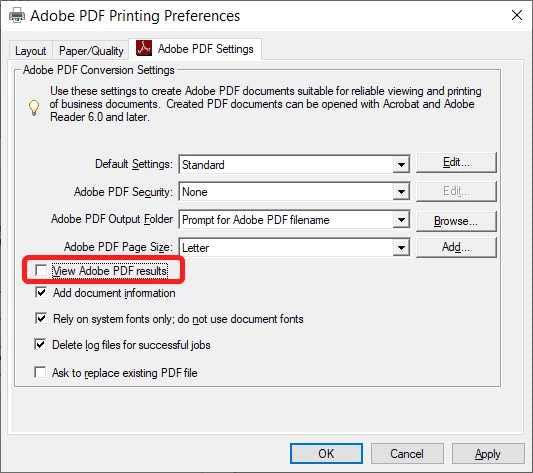
    Open the Printers & Scanners window, click "Adobe PDF" and then Manage, and Printer Preferences.

    Under "Adobe PDF Settings" un-tick the box next to "View Adobe PDF results":


    1 reply

    kglad
    Community Expert
    Community Expert
    October 11, 2023

    what do you mean by "adobe", reader or acrobat?

    Participant
    October 9, 2025

    I have the same issue, but with Adobe Reader. Whenever I use print to PDF in any application, Adobe Reader automatically opens the newly created file. How do I stop this unwanted behavior? The guidance given here for Adobe Acrobat Pro is not applicable.

    GobosToGo
    Participant
    October 23, 2025

    Hi @greg_9057


    Thanks for reaching out.

    1. Open Control Panel > Devices and Printers.
    2. Locate the Adobe PDF printer.
    3. Right-click and select Printing Preferences.
    4. In the Adobe PDF Settings tab:
      • Uncheck the box next to “View Adobe PDF results”.
    5. Click OK to save changes.


    Let us know how it works.


    Best regards,
    Tariq | Adobe Community Team


    Hi Tariq,


    This unfortunately only partially answers the question. We know how to change the setting. The problem is that the change is not persistent. So every time Adobe updates Acrobat we then have to go back and untick that box. Every time.