

Participating Frequently
October 11, 2023
Answered

How to stop Adobe from opening automatically after printing to PDF

  • October 11, 2023
  • 1 reply
  • 27677 views

Every time I "print to PDF" from anywhere, the document automatically opens in Adobe. How do i get this to stop happenng? 

    Correct answer try67

    No because that doesnt apply to me. The print to PDF feature for me DOES work in all applications. I need it to stop OPENING AUTOMATICALLY in Adobe Acrobat Pro when i print to PDF. 


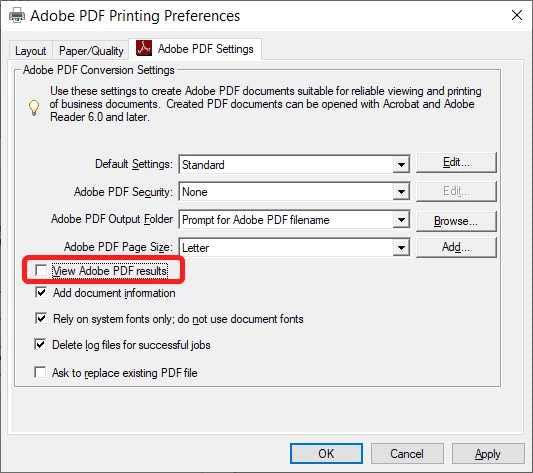
    Open the Printers & Scanners window, click "Adobe PDF" and then Manage, and Printer Preferences.

    Under "Adobe PDF Settings" un-tick the box next to "View Adobe PDF results":


    1 reply

    kglad
    Community Expert
    Community Expert
    October 11, 2023

    what do you mean by "adobe", reader or acrobat?

    Participant
    October 9, 2025

    I have the same issue, but with Adobe Reader. Whenever I use print to PDF in any application, Adobe Reader automatically opens the newly created file. How do I stop this unwanted behavior? The guidance given here for Adobe Acrobat Pro is not applicable.

    Known Participant
    October 30, 2025

    Hi @greg_9057


    Thanks for reaching out.

    1. Open Control Panel > Devices and Printers.
    2. Locate the Adobe PDF printer.
    3. Right-click and select Printing Preferences.
    4. In the Adobe PDF Settings tab:
      • Uncheck the box next to “View Adobe PDF results”.
    5. Click OK to save changes.


    Let us know how it works.


    Best regards,
    Tariq | Adobe Community Team


    My settings are reset every time I turn on my computer...


    Lena