Scott-name-already-in-use
Known Participant
September 27, 2023
Answered

How to turn OFF automatic OCR in Adobe Acrobat Pro 2023.006.20320 (September 2023)

  • September 27, 2023
  • 4 replies
  • 15022 views

I've extensively searched the knowledge base for this answer, but everything I've found pertains to old versions of the software.


How do you turn off automatic OCR in Adobe Acrobat Pro 2023.006.20320 so that it STAYS OFF? I don't want to keep opening a pdf and have the OCR run every time and have to manually turn it off every time.


I don't want OCR on AT ALL. If I want to run an OCR, I will manually start the operation myself.
Correct answer JR Boulay

"How do you turn off automatic OCR in Adobe Acrobat Pro 2023.006.20320 so that it STAYS OFF? I don't want to keep opening a pdf and have the OCR run every time and have to manually turn it off every time.

I don't want OCR on AT ALL. If I want to run an OCR, I will manually start the operation myself."


It works fine for me, I cannot reproduce this issue.

Be sure to use the "old UI".


4 replies

Fine Art P
Inspiring
January 15, 2025

The auto OCR/rotate is frustrating. It is turning images a few degrees after I import them. Sometimes undo does not work and I have to re-import the images, only to Acrobat rotate them again. Turning the feature "off" seems to have no effect on this.

Community Manager
January 16, 2025

Hi @Fine Art P @wkathym , 

Sorry for the delayed response and for the troubled experience. 
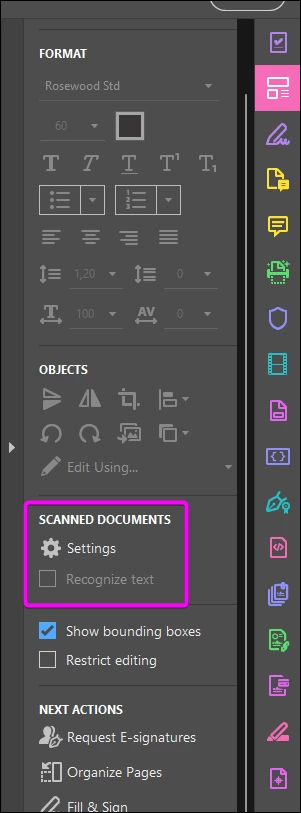
When you hit Edit, on the left-hand panel you will see the Edit options, click on the gear icon, uncheck > "Recognize scanned text" 


Let us know how it works and if you have any further questions.


~Tariq

Participant
March 12, 2025

Mine is grayed out. Any thoughts on this?


Participating Frequently
December 11, 2024

Acrobat Pro 2024.004.20272 -- I have spent a long time trying to figure this out--how to disable OCR when going into the Edit menu. I have a very large map, 24MB, and It's way too big (33x46 inches). I'd like to change the page size, which I hope will also down-res it. Everytime I go into Edit, the file hangs while it's trying to OCR all the text. This is a very large, dense map with loads of objects. I want to turn this feature OFF. 

JR Boulay
Community Expert
JR BoulayCommunity ExpertCorrect answer
Community Expert
December 21, 2023

"How do you turn off automatic OCR in Adobe Acrobat Pro 2023.006.20320 so that it STAYS OFF? I don't want to keep opening a pdf and have the OCR run every time and have to manually turn it off every time.

I don't want OCR on AT ALL. If I want to run an OCR, I will manually start the operation myself."


It works fine for me, I cannot reproduce this issue.

Be sure to use the "old UI".


Acrobate du PDF, InDesigner et Photoshopographe
e.olson
Participant
November 18, 2025

As stated in previous comments, this only turns off OCR for SCANNED documents, not for PDFs you aare just opening up to view.  It's circled right there in your own creenshot.  This is not the correct answer to this question.  The original question is still an issue.

JR Boulay
Community Expert
Community Expert
November 19, 2025

What makes you think that Acrobat can tell the difference between a document that has just been scanned, and a document that was scanned a long time ago and that you have just opened?


If you want to disable OCR during scanning, you need to disable this option:


Acrobate du PDF, InDesigner et Photoshopographe
Amal.
Community Manager
Community Manager
September 27, 2023

Hi @Scott-name-already-in-use 


Hope you are doing well and thanks for reaching out.


The OCR is turned on by default. Therefore, when you open a scanned document for editing, the current page is converted to editable text. Depending on whether you want to convert your scanned documents to editable text or not, you can turn off/on the automatic OCR option.


To turn off/on automatic OCR:


1. Choose Tools > Edit PDF.

To turn off automatic OCR, do the following:
2. In the right pane, clear the Recognize text checkbox. From next time, Acrobat won't automatically run OCR.


For more information, please go through the help page How to edit scanned PDFs, turn off automatic OCR, Adobe Acrobat


Let us know if you are experiencing any trouble and need more help.


Regards

Amal

Scott-name-already-in-use
Known Participant
September 27, 2023

Hi Amal.


Also hope you are doing well and thanks for reaching out.


Please re-read my submission. My query is about the latest version of Adobe Acrobat. Your response pertains to an old version of the software and does not apply.


Respectfully,

Scott

Amal.
Community Manager
Community Manager
September 27, 2023

Hi Scott,


We are sorry for the confusion. Please go through the help page How to edit scanned PDFs, turn off automatic OCR, Adobe Acrobat for the new Acrobat experience and check the steps provided under, 'How to disable OCR'


~Amal