

myCharlie
Inspiring
September 26, 2019
Question

How to turn off bounding box?

  • September 26, 2019
  • 6 replies
  • 5578 views

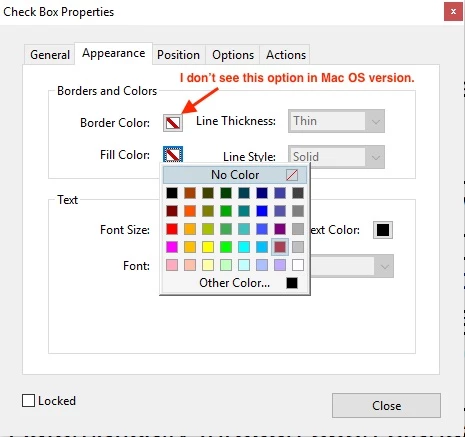
I'm on Adobe Acrobat Pro DC 2018 on a Mac. How do I turn off the bounding box on a Check Box?
This topic has been closed for replies.

6 replies

myCharlie
myCharlieAuthor
Inspiring
September 27, 2019

Document_Geek,

There is still no transparent box even if I select the Checkbox.

myCharlie
myCharlieAuthor
Inspiring
September 27, 2019

Akki_24, I do not have the option under Help.

Document Geek
Community Expert
Community Expert
September 27, 2019
Have you tried downloading the patch, using the link provided above?
myCharlie
myCharlieAuthor
Inspiring
September 27, 2019
Thanks! I updated the to the latest patch, 19.012.20040, and now I can see the Transparent checkbox now.
myCharlie
myCharlieAuthor
Inspiring
September 26, 2019

This is the version I have.

Document Geek
Community Expert
Community Expert
September 26, 2019

Is your screenshot when you click on the Border Color? Sometimes the checkbox is there, and sometimes not. When I show the colors pane when a Comment is selected, the Transparent checkbox is missing. But it does show up when I select a Checkbox (for both Border Color and Fill Color). It also shows up on a Drawing Markup fill color, but not on a drawing markup border.


myCharlie
myCharlieAuthor
Inspiring
September 26, 2019

This is what I have.

Document Geek
Community Expert
Community Expert
September 26, 2019

That is strange. I have checked several versions of Acrobat and they all have the Transparent checkbox.


I aso look a look a the colors in Preview, since it uses the same Apple color picker panel. But in Preview, the checkbox isn't there.


I wish I could help you. But I do want to thank you for this post because I finally figured out to make a drawing markup with No Fill. I've been wanting that for over a year: How to Make a PDF Drawing markup with "No Fill"


What's really interesting is that in the year since I wrote that article, the Colors pane in Acrobat has changed. Here's what it was in July 2018. There was no "Transparent" checkbox.

I don't know at what point that checkbox was added, nor by whom (Adobe or Apple). I don't know if third party developers (like Adobe) have the capability to make changes to the UI in certain programs. I'd be curious to see if someone from the Acrobat team could chime in about that checkbox, and why it's not showing up in your version of Acrobat.

myCharlie
myCharlieAuthor
Inspiring
September 26, 2019

I do not have the "Transparent" button.

Document Geek
Community Expert
Community Expert
September 26, 2019

What version of Mac OS are you on? I am on version 10.14.6. The "Transparent" checkbox would be something in the OS, so maybe you are on an earlier version.

Document Geek
Community Expert
Community Expert
September 26, 2019

It's hiding. Cick the "Transparent" button.
