



stefaan.neyts
Participant
December 5, 2019
Answered

Hyperlink to WeTransfer: url is cut off and not working

  • December 5, 2019
  • 1 reply
  • 3205 views

Hello


I have a PDF with a hyperlink to WeTransfer. The URL is shown correctly, but when hovering the URL is cut off (last 2 chars):
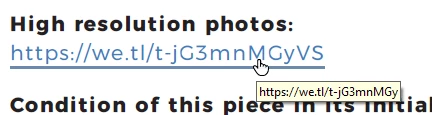
 

This URL does not work when using Acrobat Reader DC (both Mac / Windows). But it works perfect when opening the same PDF file in another program like Foxit Reader.


Attached the concerned PDF file.


Any help is appreciated.


Kind regards

Stefaan Neyts

This topic has been closed for replies.
Correct answer Test Screen Name

Is this added as a hyperlink, using link tool in Acrobat or similar? It looks as if you have not added a link and are relying on text scanning looking for hyperlinks. Here is the problem, Acrobat and Reader are confused by the type spacing and think the words are

High reso lut io n pho t o s:
https://we.tl/t-jG3mnMGy VS
Co ndit io n o f t his piece in it s init ial manufact ure:

Try adding a link or using a different PDF creator.
The usual and neg lig ible pr oduction and fir ing faults.

1 reply

Test Screen NameCorrect answer
Legend
December 5, 2019

Is this added as a hyperlink, using link tool in Acrobat or similar? It looks as if you have not added a link and are relying on text scanning looking for hyperlinks. Here is the problem, Acrobat and Reader are confused by the type spacing and think the words are

High reso lut io n pho t o s:
https://we.tl/t-jG3mnMGy VS
Co ndit io n o f t his piece in it s init ial manufact ure:

Try adding a link or using a different PDF creator.
The usual and neg lig ible pr oduction and fir ing faults.

stefaan.neyts
Participant
December 5, 2019

Thanks a lot for this explanation.

The PDF was generated with WkHtmlToPdf, and the URL was in wrapped with a <span>. We have changed it into an <a> and it's working now!