


ashimg23377171
Inspiring
January 11, 2017
Answered

hyperlinks from MS Word not working in PDF

  • January 11, 2017
  • 17 replies
  • 372617 views

Hello

I have created a MS Word document that i have converted into a pdf.

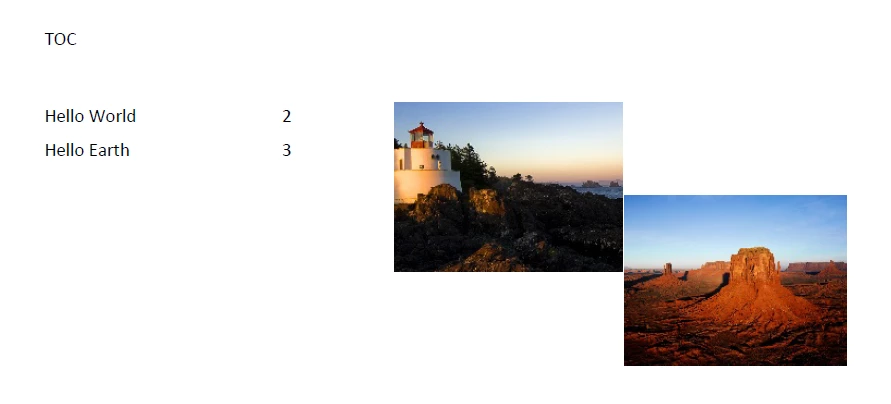
the hyperlinks in the images link to the bookmarks against headings 1 and 2 in the following pages.

However, when i convert my MS Word document into a PDf, the images are not linked, and i don't see a hand icon when i mouse over the images.
I wld appreciate if someone can provide some insight into this.

Regards

This topic has been closed for replies.
Correct answer MarkAH

Hi all,

I was having the same issue and here is what I found:

Before attempting to convert the document from Word to PDF, look to see if it says "compatibility mode" at the top of the Word window. Mine did, even though it was already a .docx file. If it does, there will be a "convert document" option under the FILE menu (which disappears after you choose this option). Choose that. It will convert to the most recent file version. After I did that, I was able to successfully save the file as PDF with the hyperlinks active. Note also that after I did this, choosing  PDF under the SAVE AS  option caused two new options to appear where I had to choose between best for electronic distribution or best for print. You want to select "electronic distribution." If you choose "print" the links will not be active.

17 replies

New Participant
May 12, 2020

Apps saved longer time

New Participant
April 3, 2020

ya...having almost same problem. My hyperlinks are working on pc, laptop and mobile in adobe. But not in normal PDF Viewer. Idont know what should I do to avail it in normal PDF Viewer. Norally when people open a file to view PDF, they select the normal PDF Viewer option and secondly how do i know if the user is having Adobe in his/her phone or not. The word doc is a book to be published where the hyperlink is added to the doc itself( in the content to the pg no. orthat page)

Bevi Chagnon - PubCom.com
Brainiac
April 3, 2020

Quote: << But not in normal PDF Viewer. >>


Please give us more information:

What do you mean by "normal PDF Viewer"?

What is the program's name and operating system?


|&nbsp;&nbsp;&nbsp;&nbsp;Bevi Chagnon &nbsp;&nbsp;|&nbsp;&nbsp;Designer, Trainer, &amp; Technologist for Accessible Documents ||&nbsp;&nbsp;&nbsp;&nbsp;PubCom |&nbsp;&nbsp;&nbsp;&nbsp;Classes &amp; Books for Accessible InDesign, PDFs &amp; MS Office |
New Participant
February 11, 2020

I have a related issue.


We create an "index" file in Word that holds hyperlinks to folders on the local Windows file system. The index file sits in the "root" folder together with all the folders that hold the various documents. The idea is to create a complete distribution (one zip file holding the tree structure) with index file (in PDF), folders and documents in the various folders.


The distribution can then be sent, unpacked and all components accessed via the one index file.


The above works well for the creator. The creator can correctly access the folders/documents via the "index" file. However when the distribution is unpacked and the index PDF is opened by a person other than the creator the links don't work. Hovering over the links in the index file shows the absolute path is stored rather than the relative path from the location of the index file and so the links break as the person will have another folder structure than the creator.


Do you know of a way to make the hyperlinks relative?

New Participant
October 17, 2020

worked for me, thanks for the note

New Participant
November 27, 2019

Bless you!! I sent a press release yesterday and was frustrated to learn that my hyperlinks (which I checked beforehand) were not working. This was for a very important client too. I researched it today and found several postings, several of which had complicated solutions or ones that were not options on my computer. I tried yours and success! I can not thank you enough. This will be invaluable in the future!


Kathleen

jeffreyjamessyrop
Known Participant
June 17, 2018

This isn't really the correct answer. A super important point is made in my answer of March 9, 2018, which provides a great workaround to make a hyperlinked PDF from Word WITHOUT sharing your document with Microsoft on line for conversion. (When you Save As a PDF, they give you 2 options: for print and for the Web. To make a web-ready PDF, you MUST click the box stating that you accept that your document is being converted on line. I can't believe they force you to do that for something so commonplace, especially considering all of the legal and secret business papers that are written in Word and require hyperlinks!

jeffreyjamessyrop
Known Participant
March 9, 2018

I just found a workaround. If you save as PDF in Word, they FORCE you to allow them to process it on line. If your document is sensitive, you may not want to do that! So I saved as HTML, and then opened the HTML document in Safari on my Mac and then in the Print dialog box, I chose Save to PDF and made a nice PDF with working links. I really hate all the problems that I keep running into in Word 2016. After all this time, things like this shouldn't be happening!

AkanchhaS8194121
Brainiac
May 3, 2017

Hi Ashimg23377171,

We apologize for the delay in response to your query.

As mentioned, you have converted a word doc to pdf. Could you please confirm how did you convert the word to pdf?

Did you save the word doc as "Save As" pdf or you used the "Create PDF" tool available in the tool bar?

You may check the settings of the application as well.

The feature can be enabled/disabled by selecting/deselecting the General > "Create links from URLs" option in the Preferences dialog. (Please note that the Preferences dialog is available in Acrobat Pro, Standard, and Reader desktop apps only.)

Regards,

Akanchha

New Participant
December 13, 2018

Mr Akanchha

I work with Windows 7 Pro 2009, have been saving Word docs as pdf for ever problem free until yesterday, now when I click save as or export to pdf I get 'there was an unexpected error msg'.

I have uninstalled / reinstalled Acrobat Reader twice, downloaded latest MS word and Adobe update but no change. To open pdf file now I get an Adobe pop up requesting permission to make change to my PC.

Please advise of repair to help

Shaun

New Participant
December 14, 2018

Adobe Reader cannot generate PDFs, it Word that failing you. Sorry


Thanks Gary

Do you think I should reinstall Word software to resolve, I haven't found any new MS responses to problem, apparently there was one download available but no longer.

Shaun