

New Participant
June 28, 2023
Answered

I can't remove a specific file from Recent files

  • June 28, 2023
  • 1 reply
  • 1604 views

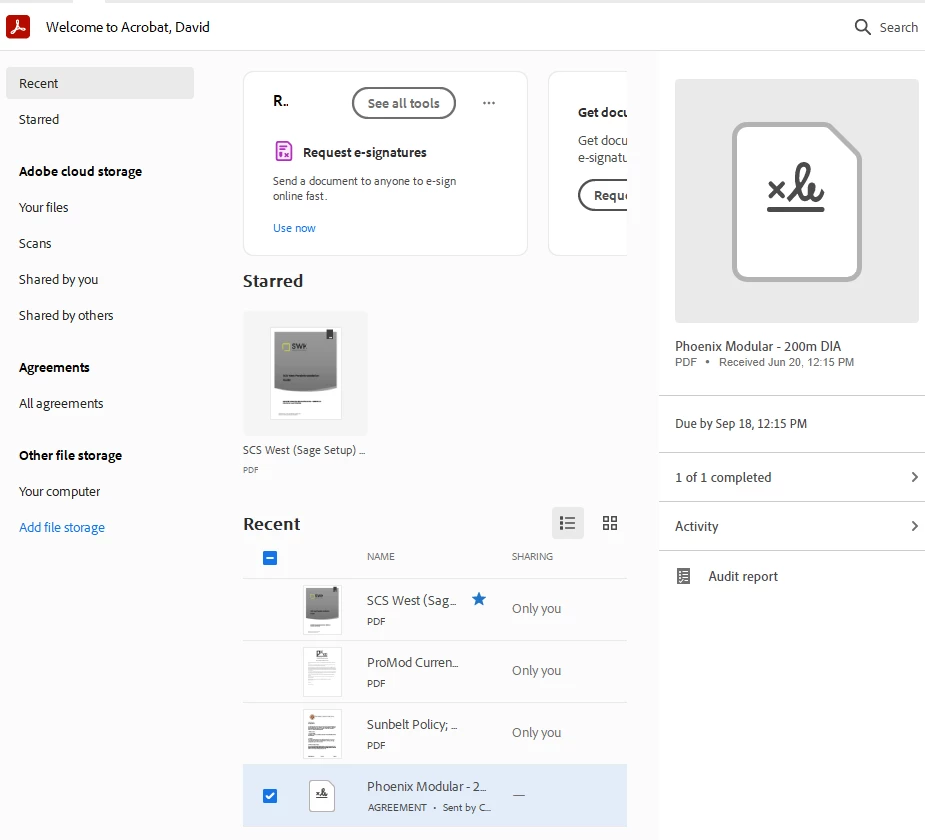
This doc is "locked" on my recent screen How can I get rid of it???


This topic has been closed for replies.
Correct answer David307771307990

Please see the screenshot. That is not an option for this document. All others, yes. This document, no.

1 reply

mariahweyne
Inspiring
June 28, 2023

Mark the document, right hand side menu


David307771307990AuthorCorrect answer
New Participant
June 28, 2023

Please see the screenshot. That is not an option for this document. All others, yes. This document, no.

AkanchhaS8194121
Brainiac
June 29, 2023

Hi @David307771307990 


Yes, you are correct! This file is stuck to your recent tabs. I see that its an agreement sent for signature to you by someone through Acrobat E-Sign. There's the possibility that it would probably not let you remove it from here.

There's a workaround, and we could give it a try. 

1- If it is no longer useful, you can delete it from your Document Cloud. Just click on Shared by others or Your files on the left-hand panel and delete this one.

Or login to your Acrobat Online account and delete it from there https://acrobat.adobe.com/link/documents/files/ as everything is synced across the Document Cloud. 


The other way around, you can "Clear Recent" to get everything removed from there and start over.


Thanks,

Akanchha
