


New Participant
May 1, 2025
Answered

I cannot split PDF into separate pdfs

  • May 1, 2025
  • 3 replies
  • 2229 views

Hello All


I am trying to split a single pdf  file into 2 separate pdf files.


But when I follow instructions (Split option) I get an error that

"File already has 2 pages or fewer"


and nothing happens


Thanks
Correct answer jane-e

@Oladotun35264994vecl 


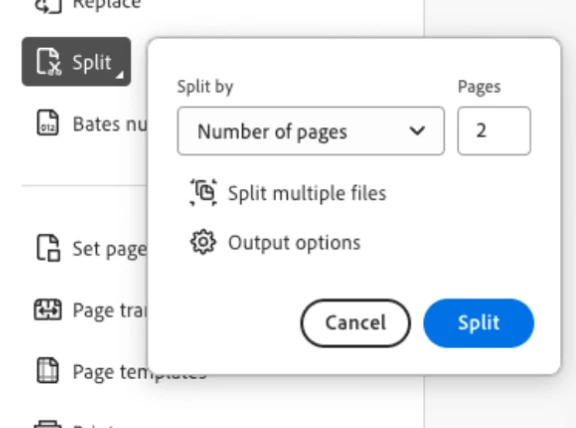
You have a two-page document and are trying to split it into every two pages. Change the number of pages to 1 to split at every page.


Jane


3 replies

New Participant
November 4, 2025

Any advice on what to do when you have a two-page document, set it to split every 1 page, and you still get the "File already has two pages or fewer" error? The kicker is that Acrobat will successfully split 1 PDF per session, though - if I open five 2-page PDFs, the first one will split but the rest will give me this error. I have to fully quit Acrobat, reopen a single file, split the pages, quit Acrobat, open the next file, etc. I'm running the most recent version, and this only started happening a month or so ago.

New Participant
November 6, 2025

I started having this issue recently too. I found a workaround, but it would be nice if this issue got fixed.


If you change the Pages to a number greater than the total number of page and click split, you'll get the same error message. Then change it back to 1 and it will split correctly

New Participant
November 6, 2025

Screenshots of the workaround


New Participant
October 15, 2025

I believe it's a problem with Acrobat. I have my setting to split document pages to 1 page, but it splits it into 2 pages even though I did not request that. This has never been an issue before. I have to close Acrobat to get this to work correctly, which is a pain to do this every time I need to split a document.

jane-e
Community Expert
October 15, 2025

@Pj Naber 


Please show a screenshot of Organize Pages and the Split function.


Jane

jane-e
Community Expert
May 1, 2025
quote

But when I follow instructions (Split option) I get an error that

"File already has 2 pages or fewer"

By @Oladotun35264994vecl


Please show a screenshot of the choices you made when you use Split. For example, are you choosing to split at every page or every two pages or at bookmarks? 


Jane


New Participant
May 1, 2025

Hello Jane, thanks for looking at this, here are the screen shots

I am on a Mac


jane-e
jane-eCorrect answer
Community Expert
May 1, 2025

@Oladotun35264994vecl 


You have a two-page document and are trying to split it into every two pages. Change the number of pages to 1 to split at every page.


Jane