


Participating Frequently
March 28, 2024
Answered

I need Multiple Checkboxes in a single line to NOT remove a previous yes/no answer already selected

  • March 28, 2024
  • 4 replies
  • 4245 views

I am creating a form and am having issues with multiple YES/NO questions on the same line, removing the previous YES/NO already selected.  I know nothing about  JAVA scripts(and have seen a few suggestions on what may help but idk) i am a beginner to this, nothing complicated, and unfortunately need this fixed today, or I have to move on to using something else.  Below is an example of where it messes up.
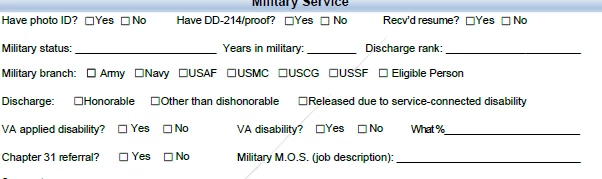
 In the 1st, and 5th rows if I select yes on Have Photo ID, AND THEN GO OVER to Have DD-215 and click NO, when I get to Recv'd resume, whatever option i chose will REMOVE the previous YES or NO checked on either one of the boxes.  It appears to not allow the same value selection within the same row.   But on lines 3 & 4 I am able to select as many options as I want or none (which is how I want it).  I am not even concerned with a YES and NO selection both being able to be checked, although the other fields which are fine on other pages do have it set that only a YES or  NO can be selected for each question asked.


Can someone please help, this has been days of re-working this form and getting nowhere.


Correct answer Nesa Nurani

To rename field there are few ways you can do it.

1. Select 'Prepare form' tool, then right-click on the field you wish to rename and select 'Rename field'.

2. Select 'Prepare form' tool, then right-click on the field you wish to rename and select 'Properties' in the 'General' tab you can change the name of the field.

Here is your file with changed names:

https://drive.google.com/file/d/1ts6q6Pg7Ayhb7nO3YKl6wSyZ7SFEsF-N/view?usp=sharing 

4 replies

Participant
July 29, 2025

I love how this clearly still an issue because here I am looking for this innformation and yet nothing has been updated to make it easier to more obvious. Also, I had to log in to my Adobe account to not only SEE this information but again to leave this comment. Hey Adobe, do better for how much you charge and gatekeep your tech. 

Participating Frequently
March 28, 2024

thank you but remember beginner beginner here, so how exactly do I rename them without changing the name of the text in the fields ? I have played around with the Fields editing and had changed the _# after each yes/no but that didn't work either.  So how do I rename these fields ?  I have no clue - thank you.


Participating Frequently
March 28, 2024

i also dont know if i should add that I created this form from a word document, so I had previusly tried to edit and add a new check box to the pdf version, but when i did that, i found that the new box was nowhere near the same size as the previously created ones from the word doc.  So not sure if tha tis also now another problem, if i need to add them.

Thom Parker
Community Expert
Community Expert
March 28, 2024

Ignore the Rashdi post. It is meaningless in this context. 


The field names have literally nothing to do with the text that appears on the page. 

Please read these articles, they will answer all your qestions:

https://www.pdfscripting.com/public/Editing-Fields-Properties.cfm 

https://www.pdfscripting.com/public/Checkboxes-and-Radio-Buttons.cfm

https://www.pdfscripting.com/public/PDF-Form-Scripting.cfm


Thom Parker - Software Developer at PDFScriptingUse the Acrobat JavaScript Reference early and often
Thom Parker
Community Expert
Community Expert
March 28, 2024

You need to rename the checkboxes so they are properly grouped. Checks that belong together need to have the same name, but different export values. 


Thom Parker - Software Developer at PDFScriptingUse the Acrobat JavaScript Reference early and often
Nesa Nurani
Community Expert
Community Expert
March 28, 2024

That is because all those checkboxes have same name but different export values, and they act as radio buttons (mutually exclusive) to fix this just rename fields.

For example, leave Have photo ID name as they are, for Have DD-214 rename both checkboxes to "Have DD-214" and for recv'd rename both checkboxes to "Recv'd"