
Known Participant
April 23, 2021
Answered

I need to calculate hours worked for a single day - timesheet

  • April 23, 2021
  • 3 replies
  • 18111 views

Hello


I am needing a script to calculate the hours worked for a single day. The only scripts I have been able to find in the community include dates.  I have tried modifying those scripts but have not had any luck.


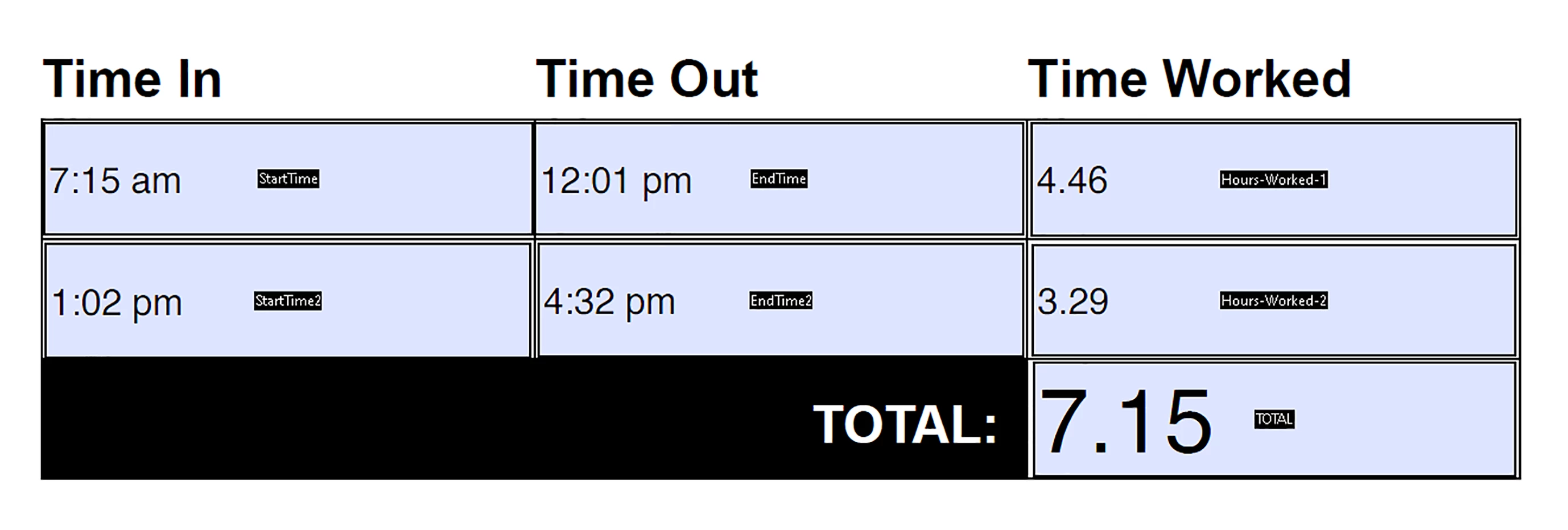
The employee will clock in when they arrive to work. They will clock out for lunch. Then clock back in when they return from lunch, and finally clock out when they leave for the day. The clock in times will be in “h:mm tt” format. They hours worked will display to the right and total hours will display at the bottom.


I am providing a screen shot with dummy text to display exactly what I need.


Hourse-Worked-1, Hours -Worked-2 and  TOTAL have a custom script format of:

event.value = util.printf("%,001.2f", event.value / 60);

Can anyone help?


Correct answer Nesa Nurani

I'm sorry, Nesa. Yes. That is correct. Not something else.


In that case,just use "value is the" in 'total' field and pick fields you want to sum and go to hoursWorked field->format tab and copy code from there and input it into same place in 'total' field and see if that helps.

3 replies

Participant
July 2, 2025

Hello Kryan!

To calculate total hours for a single workday with clock-in/out times (morning and afternoon), you can use this custom script in Acrobat:


function timeToMinutes(t) {
var d = util.scand("h:MM tt", t);
return d ? d.getHours() * 60 + d.getMinutes() : 0;
}

var in1 = timeToMinutes(this.getField("ClockIn1").value);
var out1 = timeToMinutes(this.getField("ClockOut1").value);
var in2 = timeToMinutes(this.getField("ClockIn2").value);
var out2 = timeToMinutes(this.getField("ClockOut2").value);

var total = (out1 - in1) + (out2 - in2);
event.value = util.printf("%.2f", total / 60);


This will output total hours in decimal format.


If you'd like an even easier way to handle hour calculations online, you can also check out this practical calculator: Calculadora De Horas.

Participant
October 30, 2024

<!DOCTYPE html>

<html lang="en">

<head>

    <meta charset="UTF-8">

    <meta name="viewport" content="width=device-width, initial-scale=1.0">

    <title>Time Calculator</title>

    <link rel="stylesheet" href="style.css">

</head>

<body>

    <div class="calculator">

        <h1>Time Calculator</h1>

        <div>

            <label>Hours:</label>

            <input type="number" id="hours" value="0">

        </div>

        <div>

            <label>Minutes:</label>

            <input type="number" id="minutes" value="0">

        </div>

        <div>

            <label>Seconds:</label>

            <input type="number" id="seconds" value="0">

        </div>

        <button onclick="calculate()">Calculate Total Time</button>

        <p id="result"></p>

    </div>

    <script src="script.js"></script>

</body>

</html>

body {

    font-family: Arial, sans-serif;

    display: flex;

    justify-content: center;

    align-items: center;

    height: 100vh;

    margin: 0;

    background-color: #f0f0f0;

}


.calculator {

    background: #fff;

    padding: 20px;

    border-radius: 8px;

    box-shadow: 0 0 10px rgba(0, 0, 0, 0.1);

    text-align: center;

}


.calculator h1 {

    color: #333;

}


.calculator div {

    margin: 10px 0;

}


.calculator label {

    margin-right: 10px;

}


.calculator input {

    width: 60px;

    padding: 5px;

    font-size: 1rem;

}


button {

    padding: 10px 20px;

    font-size: 1rem;

    color: #fff;

    background-color: #007bff;

    border: none;

    border-radius: 4px;

    cursor: pointer;

}


button:hover {

    background-color: #0056b3;

}


#result {

    margin-top: 20px;

    font-size: 1.2rem;

    color: #333;

}

function calculate() {

    const hours = parseInt(document.getElementById('hours').value) || 0;

    const minutes = parseInt(document.getElementById('minutes').value) || 0;

    const seconds = parseInt(document.getElementById('seconds').value) || 0;


    const totalSeconds = (hours * 3600) + (minutes * 60) + seconds;

    const displayHours = Math.floor(totalSeconds / 3600);

    const displayMinutes = Math.floor((totalSeconds % 3600) / 60);

    const displaySeconds = totalSeconds % 60;


    document.getElementById('result').innerText =

        `Total Time: ${displayHours} hours, ${displayMinutes} minutes, ${displaySeconds} seconds`;

}

for more Vist Calculrhoras

Nesa Nurani
Community Expert
Community Expert
April 23, 2021
kryan74Author
Known Participant
April 23, 2021

Thank you Nesa for your reply. I attempted to insert that script. However, I am not sure how that particular script would be implemented into my form. I am very new to this. I need to see what script goes in each form field.

Inspiring
April 23, 2021

In what format do you enter time into field?

Why use this: event.value = util.printf("%,001.2f", event.value / 60);?

How you want to show total time 7.5 or 7:30?