


Participant
July 6, 2023
Answered

If 2 of 3 Checkboxes are Checked, then Set Value to 1

  • July 6, 2023
  • 1 reply
  • 748 views

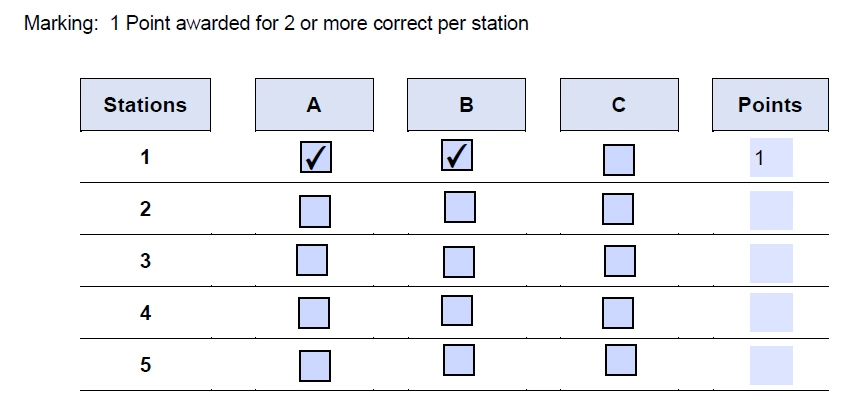
I have a form, with rows/columns of checkboxes.  What I need to do is, in a row, if any 2 of the 3 checkboxes in that row are checked, set the value of a textbox at the end of that row, to '1'.  Else, the value of the textbox should be '0'.


I'm wondering if there's a better way to accomplish that, other than writing a sloppy if/then/else statement on the mouse click event for every checkbox?


Here's an example of the form:
 

This topic has been closed for replies.
Correct answer try67

This is not a very reliable way of doing it, especially not if you want to later on calculate a total score (as what you'll see in the field will not be the actual value used for the calculation). A better solution is to use a simple calculation script, like this:


var total = 0;
if (this.getField("StationA1").valueAsString!="Off") total++;
if (this.getField("StationB1").valueAsString!="Off") total++;
if (this.getField("StationC1").valueAsString!="Off") total++;
event.value = (total>=2) ? 1 : 0;


1 reply

Eric Dumas
Community Expert
Community Expert
July 6, 2023

could each checkbox per row return an amount added to total in Points column? Each value is 0.2 with total rounded up as the number is formatted to no decimals. 

So 1 check box = total 0.2 rounded to 0

So 2 checkboxes = 0.4 rounded to 0

So 3 checkboxes = 0.6 rounded to 1

does that make sense? I did not test this

Participant
July 6, 2023

It does, with a slight variation.  Because I need the Points column to show 1 if 2 of 3 checkboxes are checked, I assigned a value of 0.25 to each checkbox.  This will give 0.5, rounded to 1, if 2 checkboxes are checked.


Thanks!

try67
Community Expert
try67Community ExpertCorrect answer
Community Expert
July 6, 2023

This is not a very reliable way of doing it, especially not if you want to later on calculate a total score (as what you'll see in the field will not be the actual value used for the calculation). A better solution is to use a simple calculation script, like this:


var total = 0;
if (this.getField("StationA1").valueAsString!="Off") total++;
if (this.getField("StationB1").valueAsString!="Off") total++;
if (this.getField("StationC1").valueAsString!="Off") total++;
event.value = (total>=2) ? 1 : 0;