



David Healy
Inspiring
June 4, 2022
Answered

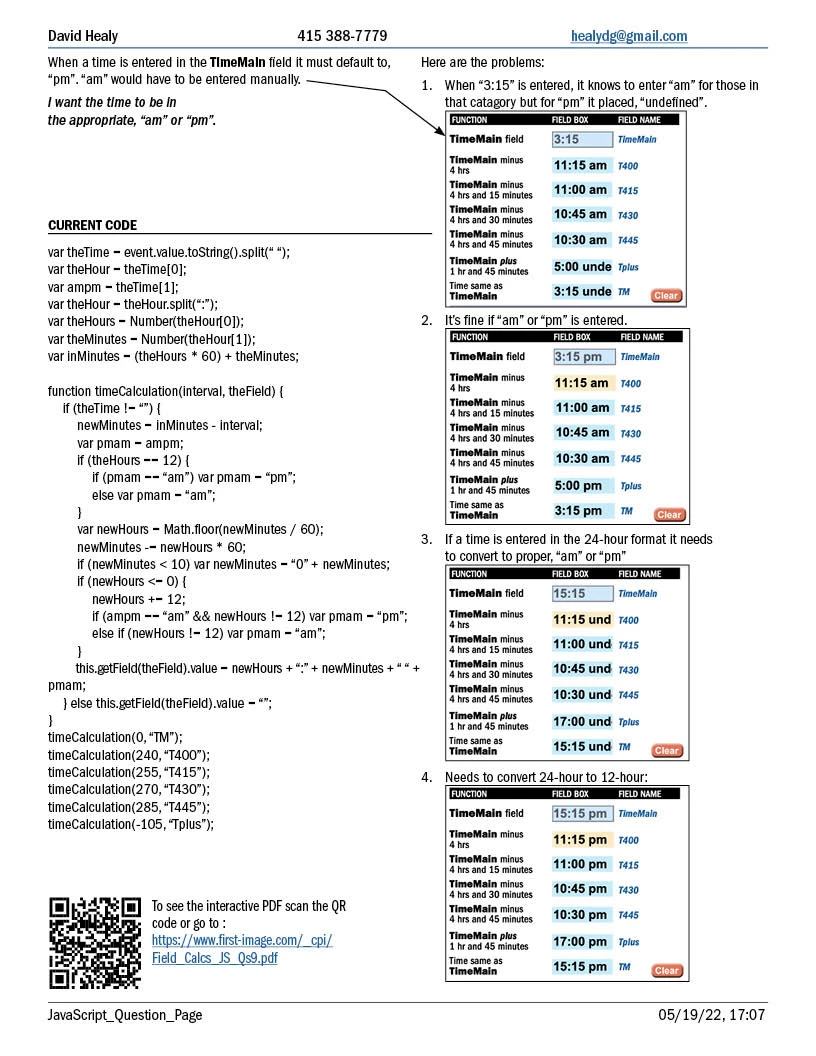
In a form controlled by JavaScript in a PDF I want the time to specified as described below
  • June 4, 2022
  • 2 replies
  • 2010 views

Here is the code I currently have:

var theTime = event.value.toString().split(“ “);

var theHour = theTime[0];

var ampm = theTime[1];

var theHour = theHour.split(“:”);

var theHours = Number(theHour[0]);

var theMinutes = Number(theHour[1]);

var inMinutes = (theHours * 60) + theMinutes;


function timeCalculation(interval, theField) {

    if (theTime != “”) {

        newMinutes = inMinutes - interval;

        var pmam = ampm;

        if (theHours == 12) {

            if (pmam == “am”) var pmam = “pm”;

            else var pmam = “am”;

        }

        var newHours = Math.floor(newMinutes / 60);

        newMinutes -= newHours * 60;

        if (newMinutes < 10) var newMinutes = “0” + newMinutes;

        if (newHours <= 0) {

            newHours += 12;

            if (ampm == “am” && newHours != 12) var pmam = “pm”;

            else if (newHours != 12) var pmam = “am”;

        }

        this.getField(theField).value = newHours + “:” + newMinutes + “ “ + pmam;

    } else this.getField(theField).value = “”;

}

timeCalculation(0, “TM”);

timeCalculation(240, “T400”);

timeCalculation(255, “T415”);

timeCalculation(270, “T430”);

timeCalculation(285, “T445”);

timeCalculation(-105, “Tplus”);


David Healy [Email address removed by moderator]


This topic has been closed for replies.
Correct answer try67

This code is unnecessarily complicated. I've simplified it for you:


function timeCalculation(interval, theField) {
	var f = this.getField(theField);
	f.value = "";
	var s = event.value;
	if (s=="") return;

	var d;
	if (/\a-z/i.test(s)) {
		d = util.scand("mm/dd/yyyy hh:MM tt", "01/01/2022 " + s);
	} else d = util.scand("mm/dd/yyyy HH:MM", "01/01/2022 " + s);
	if (d==null) return;
	
	d.setMinutes(d.getMinutes()-interval);
	f.value = util.printd("hh:MM tt", d);
}

timeCalculation(0, "TM");
timeCalculation(240, "T400");
timeCalculation(255, "T415");
timeCalculation(270, "T430");
timeCalculation(285, "T445");
timeCalculation(-105, "Tplus");

2 replies

try67
Community Expert
Community Expert
June 4, 2022

Change this line:

var ampm = theTime[1];


To this:

var ampm = "";
if (theTime.length==2)
ampm = theTime[1];


Also, you should only use "var" once, at the first time you declare the variable.

David Healy
Inspiring
June 5, 2022

I made the change you mentioned but when a time like, “2:20” is entered it defaults to, “am”. “15:15” converts to 3:15 pm but in the calculated fields it didn't show as “am” or “pm” and the 24-hour time didn't convert to 12-hour (see screen shot)


Here is the code with your new code in bold:

var theTime = event.value.toString().split(“ “);

var theHour = theTime[0];

var ampm = “”;

if (theTime.length==2)

ampm = theTime[1];

var theHour = theHour.split(“:”);

var theHours = Number(theHour[0]);

var theMinutes = Number(theHour[1]);

var inMinutes = (theHours * 60) + theMinutes;


function timeCalculation(interval, theField) {

    if (theTime != “”) {

        newMinutes = inMinutes - interval;

        var pmam = ampm;

        if (theHours == 12) {

            if (pmam == “am”) var pmam = “pm”;

            else var pmam = “am”;

        }

        var newHours = Math.floor(newMinutes / 60);

        newMinutes -= newHours * 60;

        if (newMinutes < 10) var newMinutes = “0” + newMinutes;

        if (newHours <= 0) {

            newHours += 12;

            if (ampm == “am” && newHours != 12) var pmam = “pm”;

            else if (newHours != 12) var pmam = “am”;

        }

        this.getField(theField).value = newHours + “:” + newMinutes + “ “ + pmam;

    } else this.getField(theField).value = “”;

}

timeCalculation(0, “TM”);

timeCalculation(240, “T400”);

timeCalculation(255, “T415”);

timeCalculation(270, “T430”);

timeCalculation(285, “T445”);

timeCalculation(-105, “Tplus”);


When I tried to submit this it posted this note, “Your post has been changed because invalid HTML was found in the message body. The invalid HTML has been removed. Please review the message and submit the message when you are satisfied.” What is this about?

try67
Community Expert
try67Community ExpertCorrect answer
Community Expert
June 5, 2022

This code is unnecessarily complicated. I've simplified it for you:


function timeCalculation(interval, theField) {
	var f = this.getField(theField);
	f.value = "";
	var s = event.value;
	if (s=="") return;

	var d;
	if (/\a-z/i.test(s)) {
		d = util.scand("mm/dd/yyyy hh:MM tt", "01/01/2022 " + s);
	} else d = util.scand("mm/dd/yyyy HH:MM", "01/01/2022 " + s);
	if (d==null) return;
	
	d.setMinutes(d.getMinutes()-interval);
	f.value = util.printd("hh:MM tt", d);
}

timeCalculation(0, "TM");
timeCalculation(240, "T400");
timeCalculation(255, "T415");
timeCalculation(270, "T430");
timeCalculation(285, "T445");
timeCalculation(-105, "Tplus");
David Healy
Inspiring
June 4, 2022

Here is the PDF: