


Known Participant
February 16, 2023
Answered

Installing Acrobat Pro instead of Acrobat Standard

  • February 16, 2023
  • 2 replies
  • 4176 views

Hi, 

           I need to install Acrobat Standard 2022 in my windows 11 machine, 

           I downloaded Acrobat Standard installer from the link 

           Download Acrobat installer for Enterprise term or VIP license (adobe.com),

           After downloading acrobat Standard from the list, I installed it in my Windows 11 machine, but when I open the acrobat, it is not Acrobat Standard but Acrobat Pro.    For software testing purpose, we need to use Acrobat Standard 2022, but it is installing Acrobat Pro in that system. 
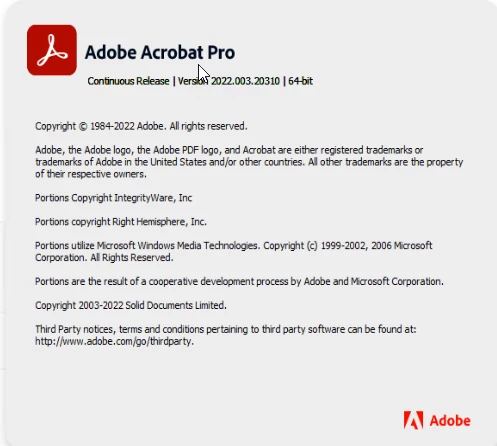
Please help me to install Acrobat Standard 2022 to my system.

palaksha,

This topic has been closed for replies.
Correct answer ls_rbls

Maybe there is an older installation of Adobe Acrobat Reader or Acrobat Pro.


If that would be the case use the AcrCleaner tool before performing a new installtion.


2 replies

Bernd Alheit
Community Expert
Community Expert
February 16, 2023

The installer is for Acrobat Reader, Acrobat Standard, and Acrobat Pro.

ls_rbls
Community Expert
Community Expert
February 16, 2023

++ EDITED REPLY


Hi,


For troubleshooting purposes, Did you tried this link:


Known Participant
February 16, 2023

It allows us to download  Acrobat Standard 2020,  and even with that, it is installing Acrobat Pro only.

ls_rbls
Community Expert
Community Expert
February 16, 2023

That seems very strange.


Did you contact Adobe Customer Care and see if they are able to assist?