


Inspiring
December 27, 2023
Question

Issue creating droplet on macOS Sonoma

  • December 27, 2023
  • 2 replies
  • 2886 views

Hello there,

I am having troubles using Droplets on macOS Sonoma.

I followed the standard procedure to create a droplet from Acrobat > Print production > Preflight > Convert font to outlines (for example), setting up Fail/Success folders and saving it to the desktop. 

Drag-and-dropping a PDF (or several) on top of the droplet icon returned this error:
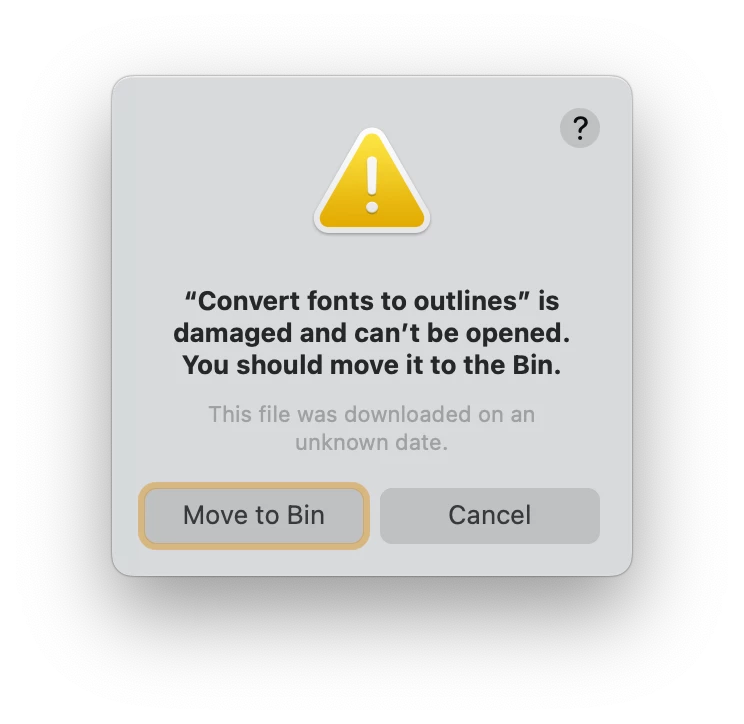
Initially thinking it an issue with permissions or notarisation, I held down Option and tried again, this time making a Forbibben sign appear on the droplet icon. 

Is this a known issue with creating/using droplets on Apple Silicon? 

2 replies

New Participant
July 20, 2024

is there a way to get the droplet to work on Sonoma 14.5? having to do a work-around seems like Adobe doesn't want to address the issue of the program not working properly on Sonoma.

Amal.
Community Manager
Community Manager
December 28, 2023

Hi @Inélsòre 


Hope you are doing well and thanks for reaching out.


Please go through the correct answer marked in the similar discussions listed below

https://community.adobe.com/t5/acrobat-discussions/droplets-not-working-on-macos-ventura/m-p/13319056#M385646

https://community.adobe.com/t5/acrobat-discussions/preflight-convert-fonts-to-outlines-not-working/m-p/13936521#M419814 and see if that works for you.


~Amal

Inspiring
December 28, 2023

No, none of these solutions allow the droplet to be run on macOS Sonoma 14.2.1.

Also, this worked in Montery without extra user intervention, let alone Terminal or Privacy settings. 

Please make it work again. 

Amal.
Community Manager
Community Manager
January 1, 2024

Hi there,


Would you mind collecting the Adobe CC logs https://helpx.adobe.com/creative-cloud/kb/cc-log-collector.html  , and print logs as described below and share them via any cloud storage for further investigation.

Steps for print logs on MAC


  • Place the plist file com.adobe.Acrobat.FeatureState.plist at location /Library/Application Support/Adobe/Acrobat/Trunk/Preferences
  • Execute the print workflow 
  • Logs will be generated at  a location similar to  /var/folders/t9/93cz_sz9075d4nl5hqrlc6n00000gn/T. 
  • The temp folder where the logs are generated is different for different users which is common only upto  /var/folders. 
  • To get the exact path of the file use the following command on terminal “ sudo find / -name AcrobatPrintLogs.txt “ 
  • once you get the complete path eg like /private/var/folders/jk/vgtyw__s2dsdphtygd_0jslr0000gn/T/AcrobatPrintLogs.txt 
  • just add cat as follows cat /private/var/folders/jk/vgtyw__s2dsdphtygd_0jslr0000gn/T/AcrobatPrintLogs.txt 
  • One can see AcrobatPrintLogs


Regards
Amal