


Known Participant
July 12, 2023
Answered

Issue with colors printing but not displaying in PDF.

  • July 12, 2023
  • 1 reply
  • 510 views

I have a pdf that someone else created and the black (or something close to that) text displays as white on the screen but prints correctly.

Similarly, I have another document I created where a red doesn't disply but prints correctly.

Is there a setting I can change to correct this?
This topic has been closed for replies.
Correct answer Amal.

Hi @Jean.T 


Hope you are doing well and thanks for reaching out.


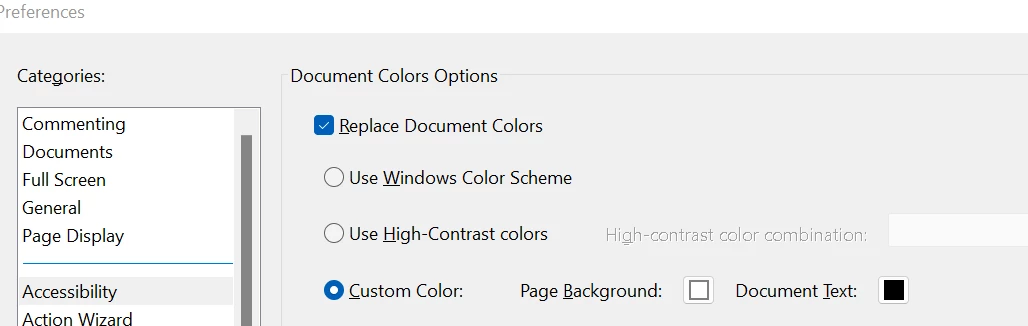
Please go to Edit (Win), Adobe Acrobat (Mac) > Preferences > Accessibility > Under document color Options, Replace documents colors,   Set custom color: Page Background to White and Document text to Black.


Let us know how it goes.


Regards

Amal


1 reply

Amal.
Community Manager
Amal.Community ManagerCorrect answer
Community Manager
July 13, 2023

Hi @Jean.T 


Hope you are doing well and thanks for reaching out.


Please go to Edit (Win), Adobe Acrobat (Mac) > Preferences > Accessibility > Under document color Options, Replace documents colors,   Set custom color: Page Background to White and Document text to Black.


Let us know how it goes.


Regards

Amal


Jean.TAuthor
Known Participant
July 20, 2023

Thank you! I already had that setting in place, so by unchecking 'Replace Document Colors' I can now see the missing background and the white text that's on it.