


nenac12040105
Participating Frequently
August 6, 2019
Answered

Keep losing text even after saving the file every few minutes.

  • August 6, 2019
  • 2 replies
  • 5760 views

Hi,

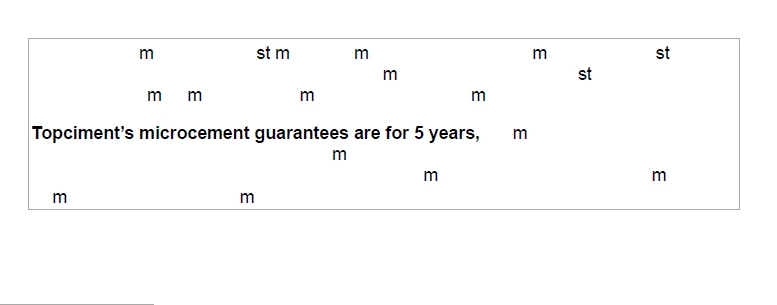
So I have created a PDF file...I have been trying to work on it in multiple sessions. Every time I close the file (after saving) and come back to it. The file has missing lines, half the text is missing ..and footers are completely lost.

Not sure what is happening? it's making me crazy.

Any help appreciated,

Regards

Nena
This topic has been closed for replies.
Correct answer gary_sc

I am attaching a screen shot to show what happens

Regards,

Nena


Hi Nena,

ok, I’m guessing here but I think that it’s because of the way you‘re using Acrobat.

Edit it is to edit, not create. Because you are adding text by copying and pasting from word, the font is not being embedded into the document and I think that that might be why things are somewhat flaky.

Acrobat is for digital printing, not digital creation. Editing is for minor adjustments when you do not have access to the original application or document.

Which brings me me to my next question: why are you creating in Acrobat? Do you have access to the original application?

let me know

2 replies

Legend
August 6, 2019

I do not recommend ANY program for editing PDF documents. PDFs are just not made for it. Kudos to Adobe's marketing department for trying to convince us otherwise. It should never be necessary to recreate a Word document, it is vital to KEEP all original documents.

gary_sc
Community Expert
Community Expert
August 6, 2019

Hi Nena,

Hmm, interesting problem. I have questions.

The basics: What is your OS (and what release number)? What version of Acrobat are you using (and what release number)?

Now the specifics: what kind of work are you doing to this document and which tab are you using (Edit, Comment, Organize Pages, etc.)?

Lastly, exactly what is your workflow when doing what you're doing?

Thanks,

nenac12040105
Participating Frequently
August 6, 2019

Hi Gary,

Thanks for the reply.

Let me try to answer your question :

1. What is your OS (and what release number)? Windows 10 home Version 1903 OS Build 18362.239

2 What version of Acrobat are you using (and what release number)? Adobe Acrobat Pro DC Continuous release Version 2019 .012.20035

3 what kind of work are you doing to this document and which tab are you using (Edit, Comment, Organize Pages, etc.)

I am using the edit tab only. I have copied and pasted some text from a word doc into text box.

As far as workflow: I trying to create some data sheets ..with header and footers and simple text box with some images inserted.

The footer has black band across the bottom of the page  and on top of the band I put test box and white colour text, so it can be seen. I save it and when I re-open the doc...that's one of the things missing.  I put in a text box with company information.( Only the text ) Some not all text through out the document disappears leaving blank text boxes.

I hope this answers everything. Again ,thank you for your help.

Nena

nenac12040105
Participating Frequently
August 6, 2019

I am attaching a screen shot to show what happens

Regards,

Nena