

Known Participant
November 28, 2023
Answered

line above the text box

  • November 28, 2023
  • 5 replies
  • 6672 views

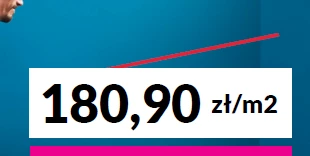
Hello, I would like to make the price crossed out in the text field (example below; Adobe Acrobat Pro). Unfortunately, the line hides under this field, which has a white fill. How can I get it to be over?



This topic has been closed for replies.
Correct answer Nesa Nurani

Here is a simple workaround using image field, try and see if it's working for you.

https://drive.google.com/file/d/1Oc_i7S_7DWiCmEqQ6jaPEQULKGqawTVI/view?usp=sharing 

5 replies

Nesa Nurani
Nesa NuraniCorrect answer
Community Expert
December 1, 2023

Here is a simple workaround using image field, try and see if it's working for you.

https://drive.google.com/file/d/1Oc_i7S_7DWiCmEqQ6jaPEQULKGqawTVI/view?usp=sharing 

Known Participant
December 4, 2023

Hi, looks ok, but in my opinion image field makes difficult to edit the price. Every time when I click on price it image field with red line which opens (properties box). Only way to edit the price is via the commenting panel. For me it's ok, but the sellers need to be trained to use this type of file. For them it will be something new 🙂 

Thank you for your help!


try67
Community Expert
November 29, 2023

As mentioned, it can only be done using annotations, so the user will have to enter the amount indirectly.


I can create for you a script that will allow you to achieve that, if you're interested, for a fee.

You can contact me privately by clicking my user-name and then on "Send a Message" to discuss it further.

ls_rbls
Community Expert
November 29, 2023

Hi @Katarzyna31553090gbjo ,


Do you mid sharing that PDFfile?

Known Participant
November 29, 2023

Here is the file. Both prices should be editable, so that's why I used text boxes (sellers in the store will enter prices there themselves). 

Known Participant
December 1, 2023

Hi,

I don't have the right font here, but you could replace the price field by a text box annotation where you can modify the text font and color and the color of the background to be the same as the rectagle stamp.

and the result (with a wrong font):

and you can modify the price directly from the annotation window.

@+


Maestro!!! It looks like it should look like. 

The only small problem is that this field does not anchor, I can move it anywhere, and sellers cannot be allowed to do so, because they will soon "destroy" the layout of the entire label.

Amal.
Community Manager
Community Manager
November 28, 2023

++ Adding to the discussion


Please go through the help article https://www.adobe.com/acrobat/hub/how-to-use-strikethrough-on-a-pdf-file.html and see if that helps.


~Amal


Known Participant
November 29, 2023

Unfortunately it doesn't work... Prices are in the text boxes (they should be editable, sellers in the store will enter prices there themselves) and apparently this tool doesn't work on text boxes.

Thom Parker
Community Expert
November 28, 2023

You can't, at least not reliably.  The only way to do this is for the price to either be in the page content, or for you to create a custom annotation that includes both the price value and the red line. 


Thom Parker - Software Developer at PDFScriptingUse the Acrobat JavaScript Reference early and often
Known Participant
November 29, 2023

Prices in the text boxes should be editable, sellers in the store will enter prices there themselves. So, the prices can't be on the page content/page background.

Thom Parker
Community Expert
November 29, 2023

TThe strikethrough is a commenting annotation. It cannot be used to reliably cover a form field.


The only option for creating a price with a line through it is to use a combined commenting annotation. A text box combined with a line annot. Commenting annotations can be grouped, made readonly, and locked. So after the price is  entered it  can't be changed or moved (manually on the page), and the line will stay on top. 

The text value can be changed from the commenting window. 


Thom Parker - Software Developer at PDFScriptingUse the Acrobat JavaScript Reference early and often