


Participating Frequently
August 2, 2025
Answered

Link Duplication

  • August 2, 2025
  • 2 replies
  • 1822 views

Hi community,

I have a planner with 605 pages (with the cover), from page 2 to the end, I have a side bar that contains the 12 months, when someone clicks on it, it gonna head over that specific month, I have added hyperlinks to the Page 2, now I need a way to automate pasting only hyperlinks to all the other pages, layout already exist in all pages, but I need to paste hyperlinks, adding them manually will waste my time and effort (see attached photo to see what I am talking about). If someone could help me with the javascript because I am not familiar with programming
Correct answer JR Boulay

You cannot duplicate or copy-paste Link objects.

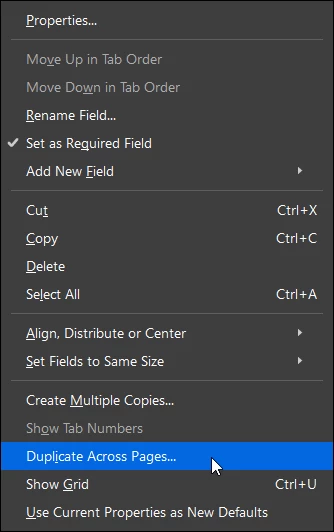
You must use Buttons form fields instead. Create them on the first page, select all, right-clic on any one and choose "Duplicate across pages".


2 replies

JR Boulay
Community Expert
August 4, 2025

After links/buttons creation just "save as" the PDF using Acrobat Pro, if you need to optimize it do it before links/buttons creation.


Chrome is a spyware, and also a web browser. It's not a PDF viewer, you should not use it.

Acrobate du PDF, InDesigner et Photoshopographe
JR Boulay
JR BoulayCorrect answer
Community Expert
August 2, 2025

You cannot duplicate or copy-paste Link objects.

You must use Buttons form fields instead. Create them on the first page, select all, right-clic on any one and choose "Duplicate across pages".


Acrobate du PDF, InDesigner et Photoshopographe
yassmineeAuthor
Participating Frequently
August 3, 2025

thank you so much, it worked😃

JR Boulay
Community Expert
August 4, 2025

What software do you use to open exported PDFs?

Acrobate du PDF, InDesigner et Photoshopographe