


Participating Frequently
August 2, 2025
Answered

Link Duplication

  • August 2, 2025
  • 2 replies
  • 1822 views

Hi community,

I have a planner with 605 pages (with the cover), from page 2 to the end, I have a side bar that contains the 12 months, when someone clicks on it, it gonna head over that specific month, I have added hyperlinks to the Page 2, now I need a way to automate pasting only hyperlinks to all the other pages, layout already exist in all pages, but I need to paste hyperlinks, adding them manually will waste my time and effort (see attached photo to see what I am talking about). If someone could help me with the javascript because I am not familiar with programming
Correct answer JR Boulay

You cannot duplicate or copy-paste Link objects.

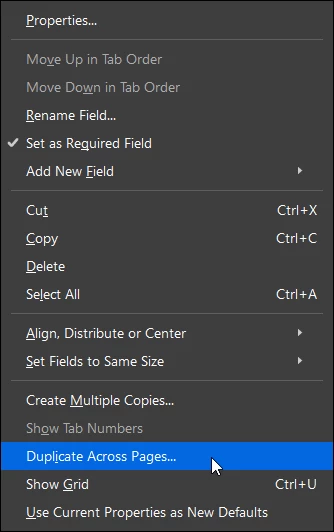
You must use Buttons form fields instead. Create them on the first page, select all, right-clic on any one and choose "Duplicate across pages".


2 replies

JR Boulay
Community Expert
Community Expert
August 4, 2025

After links/buttons creation just "save as" the PDF using Acrobat Pro, if you need to optimize it do it before links/buttons creation.


Chrome is a spyware, and also a web browser. It's not a PDF viewer, you should not use it.

Acrobate du PDF, InDesigner et Photoshopographe
JR Boulay
Community Expert
JR BoulayCommunity ExpertCorrect answer
Community Expert
August 2, 2025

You cannot duplicate or copy-paste Link objects.

You must use Buttons form fields instead. Create them on the first page, select all, right-clic on any one and choose "Duplicate across pages".


Acrobate du PDF, InDesigner et Photoshopographe
yassmineeAuthor
Participating Frequently
August 4, 2025

I have an issue while doing this, buttons worked but when I export the pdf and click on a hyerlink a dotted outine appears when clicking even though I disabled show focus rectangle, any suggestions

try67
Community Expert
Community Expert
August 4, 2025

as PDF


Why are you exporting a PDF as a PDF?