Participating Frequently
June 14, 2016
Answered

Lost the ability to convert to pdf from excel

  • June 14, 2016
  • 2 replies
  • 42121 views

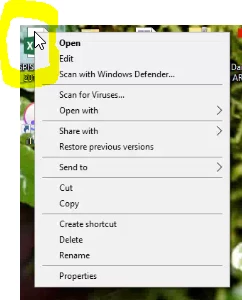
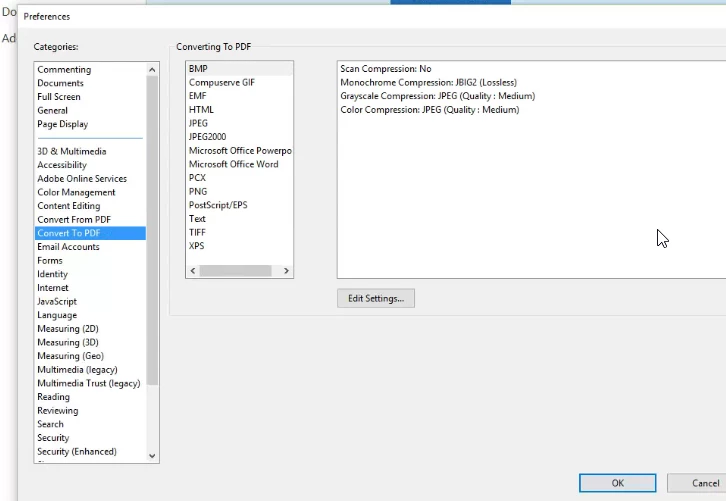
Using win 10, Upgraded office 2010, to office 365..  lost the ability to convert an excel to pdf.  In adobe acrobat std, there is the "convert to" preference listing and excel is not in there, see attached.  I attached a second pic and that show right clicking an excel fiIe should give you the combine or convert option. checked another pc and the ms excel is in the preference list.  I had also updated adobe to  acrobat DC 2015 (the latest release) and didn't fix it.  Microsoft is not really sure what the issue could be, so I thought I would see if anyone else had this issue.

The convert to pdf, does work in word and power point.  so excel is the only

issue.
This topic has been closed for replies.
Correct answer Adorobat

Hi ,

Could you let us know the operating system installed on the machine?

What is the dot version of Acrobat DC installed on the machine?

What are the steps you are doing to convert excel file to pdf?

Are you able to convert to pdf from other MS Office applications like MS Word?

Visit the following links which discusses the same issue:

Cannot create PDF files using Excel

Unable to create Excel to pdf files from within Adobe XI Pro

Unable to convert XLS to PDF

Cannot convert Office 2013 documents to PDF

Let us know if it worked.

Thank You,

Shivam

2 replies

andrew lo
New Participant
September 8, 2016

Hi All

please advise what is the end solution to this issue?

thank you

Adorobat
Community Manager
AdorobatCommunity ManagerCorrect answer
Community Manager
September 8, 2016

Hi ,

Could you let us know the operating system installed on the machine?

What is the dot version of Acrobat DC installed on the machine?

What are the steps you are doing to convert excel file to pdf?

Are you able to convert to pdf from other MS Office applications like MS Word?

Visit the following links which discusses the same issue:

Cannot create PDF files using Excel

Unable to create Excel to pdf files from within Adobe XI Pro

Unable to convert XLS to PDF

Cannot convert Office 2013 documents to PDF

Let us know if it worked.

Thank You,

Shivam

Adorobat
Community Manager
Community Manager
June 14, 2016

Hi grainm45177146 ,

Could you please tell if you are able to see the Acrobat tab in Excel Ribbon ?

Below is the screenshot of the Ribbon with Acrobat tab.

Try to repair Acrobat DC 2015 , Open Acrobat, go to Help>Repair Installation .

After repair , restart the computer and then try to convert .

Let us know about the results.

Thanks!

Shivam

Participating Frequently
June 14, 2016

missing the last one, do repair?

Participating Frequently
June 15, 2016

ran the cleaner, restarted and reinstalled.  and same thing, didn't fix it.


this is all I see