
Exit
  • Global community
    • Language:
      • Deutsch
      • English
      • Español
      • Français
      • Português
  • 日本語コミュニティ
  • 한국 커뮤니티
0

Making read-only fields to certain sections once checked on

Explorer ,
Nov 27, 2018 Nov 27, 2018

Hi,

I have my client who wants to have a workflow where if person A fills up section A, he will check on the checkbox and only Section A would be read-only. Then he sends it to person B and fills up section B and similarly check on a different checkbox and section B is read-only as shown in the image.
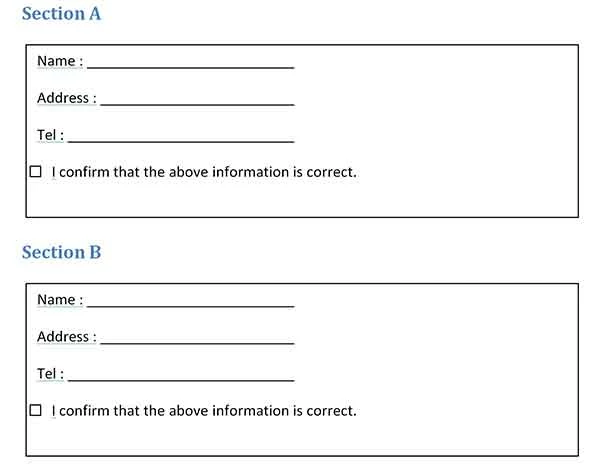
form_readOnly.jpg

Any thoughts on this?

Thanks with regards,

James

TOPICS
PDF forms
4.1K
Translate
Report
Community guidelines
Be kind and respectful, give credit to the original source of content, and search for duplicates before posting. Learn more
community guidelines
1 ACCEPTED SOLUTION
Community Expert ,
Dec 03, 2018 Dec 03, 2018

You can use the following code as the MouseUp event of the field, then:

this.getField("FieldA").readonly = true;

this.getField("FieldB").readonly = true;

this.getField("FieldC").readonly = true;

etc. (use the actual field names you want to "lock", of course).

And if you want to lock the check-box field itself then add it too to that list.

View solution in original post

Translate
Report
Community guidelines
Be kind and respectful, give credit to the original source of content, and search for duplicates before posting. Learn more
community guidelines
Community Expert ,
Nov 28, 2018 Nov 28, 2018

It's possible, but if you want it to really be secure use a digital signature instead of a check-box, and set it to lock those fields.

Translate
Report
Community guidelines
Be kind and respectful, give credit to the original source of content, and search for duplicates before posting. Learn more
community guidelines
Explorer ,
Nov 28, 2018 Nov 28, 2018

Hi try 67,

My clients prefer using a checkbox to lock the sections instead as he wants it simple rather than having a digital signature workflow.

Do you know how to lock the various sections and what is the code for that?

Thanks and regards,

James

Translate
Report
Community guidelines
Be kind and respectful, give credit to the original source of content, and search for duplicates before posting. Learn more
community guidelines
Community Expert ,
Nov 28, 2018 Nov 28, 2018

Should the fields become "un-locked" if the box is "un-ticked"?

Translate
Report
Community guidelines
Be kind and respectful, give credit to the original source of content, and search for duplicates before posting. Learn more
community guidelines
Explorer ,
Dec 02, 2018 Dec 02, 2018

Hi try67,

Once the checkbox is checked and if person A already saves it, then the checkbox in Section A cannot be unchecked.

I hope that clarifies the situation.

Thanks with regards,

James

Translate
Report
Community guidelines
Be kind and respectful, give credit to the original source of content, and search for duplicates before posting. Learn more
community guidelines
Community Expert ,
Dec 03, 2018 Dec 03, 2018

You can use the following code as the MouseUp event of the field, then:

this.getField("FieldA").readonly = true;

this.getField("FieldB").readonly = true;

this.getField("FieldC").readonly = true;

etc. (use the actual field names you want to "lock", of course).

And if you want to lock the check-box field itself then add it too to that list.

Translate
Report
Community guidelines
Be kind and respectful, give credit to the original source of content, and search for duplicates before posting. Learn more
community guidelines
Explorer ,
Dec 03, 2018 Dec 03, 2018

Hi try67,

Thanks for your help. Yes it works.

However, is it possible for me to disable the blinking text cursor in the text-fields even though you have set it to read-only? It's quite distracting.

Thanks with regards,

James

Translate
Report
Community guidelines
Be kind and respectful, give credit to the original source of content, and search for duplicates before posting. Learn more
community guidelines
Community Expert ,
Dec 04, 2018 Dec 04, 2018

Not sure what you mean...

Translate
Report
Community guidelines
Be kind and respectful, give credit to the original source of content, and search for duplicates before posting. Learn more
community guidelines
Explorer ,
Dec 09, 2018 Dec 09, 2018

Hi try67,

Apologies if I didn't make myself clear.

If you observe the image I have attached,

blinking_cursor.jpg

Even though I have already set the respective fields to 'readonly', if a person clicks on the field again, there is a blinking cursor as shown. This might give a user the false impression that they can continue to input.  Is there anyway of removing the blinking cursor?

Thanks with regards,

James

Translate
Report
Community guidelines
Be kind and respectful, give credit to the original source of content, and search for duplicates before posting. Learn more
community guidelines
Community Expert ,
Dec 10, 2018 Dec 10, 2018

That doesn't happen when you use the Hand tool. Maybe you're using the Text Selection tool? If so, that can't be avoided. Even if you flatten the field the user will still be able to select the text using that too and place the cursor there. You can make it more clear that a field is not editable, though, but enabling the Fields Highlight color. It will be blue when the field can be edited and white when it's not.

Translate
Report
Community guidelines
Be kind and respectful, give credit to the original source of content, and search for duplicates before posting. Learn more
community guidelines
Explorer ,
Dec 10, 2018 Dec 10, 2018

Hi try67,

Yes. Indeed I have used the Text Selection Tool.

Looks like I need to convey to my clients to enable the Fields Highlight color to view the areas for input.

Anyway, thanks for your help!

Cheers!

James

Translate
Report
Community guidelines
Be kind and respectful, give credit to the original source of content, and search for duplicates before posting. Learn more
community guidelines
Community Expert ,
Dec 04, 2018 Dec 04, 2018

You can switch to a other field with setFocus().

Translate
Report
Community guidelines
Be kind and respectful, give credit to the original source of content, and search for duplicates before posting. Learn more
community guidelines
Explorer ,
Dec 09, 2018 Dec 09, 2018

Hi Bernd,

Thanks for helping.

Is it possible to setFocus to nothing instead of switching to other fields? Care to give a sample code to illustrate this?

Thanks with regards,

James

Translate
Report
Community guidelines
Be kind and respectful, give credit to the original source of content, and search for duplicates before posting. Learn more
community guidelines
Community Expert ,
Dec 09, 2018 Dec 09, 2018

setFocus to nothing is not possible.

Translate
Report
Community guidelines
Be kind and respectful, give credit to the original source of content, and search for duplicates before posting. Learn more
community guidelines
Explorer ,
Dec 10, 2018 Dec 10, 2018

Hi Bernd,

Thanks for helping anyway.

Cheers!

James

Translate
Report
Community guidelines
Be kind and respectful, give credit to the original source of content, and search for duplicates before posting. Learn more
community guidelines
New Here ,
Oct 14, 2024 Oct 14, 2024

hii what should the code be if i want this condition?

Translate
Report
Community guidelines
Be kind and respectful, give credit to the original source of content, and search for duplicates before posting. Learn more
community guidelines
New Here ,
Oct 14, 2024 Oct 14, 2024

fields become "un-locked" if the box is "un-ticked"

Translate
Report
Community guidelines
Be kind and respectful, give credit to the original source of content, and search for duplicates before posting. Learn more
community guidelines
Community Expert ,
Oct 14, 2024 Oct 14, 2024

Replace true with false.

Translate
Report
Community guidelines
Be kind and respectful, give credit to the original source of content, and search for duplicates before posting. Learn more
community guidelines
New Here ,
Oct 15, 2024 Oct 15, 2024

hi thank you for your reply! im actually trying to do something where when the checkbox is ticked all the fields are "locked" but when the checkbox is "unticked" fields 1-5 are "unlocked" but fields 5-10 are still "locked" because their trigger is a different checkbox. i hope this makes sense

Translate
Report
Community guidelines
Be kind and respectful, give credit to the original source of content, and search for duplicates before posting. Learn more
community guidelines
Community Expert ,
Oct 15, 2024 Oct 15, 2024

What script do you use currently?

Translate
Report
Community guidelines
Be kind and respectful, give credit to the original source of content, and search for duplicates before posting. Learn more
community guidelines
New Here ,
Oct 15, 2024 Oct 15, 2024

this script works okay for the locking part but im not sure what to do about the unlocking

this.getField("FieldA").readonly = true;

this.getField("FieldB").readonly = true;

this.getField("FieldC").readonly = true;

Translate
Report
Community guidelines
Be kind and respectful, give credit to the original source of content, and search for duplicates before posting. Learn more
community guidelines
Community Expert ,
Oct 15, 2024 Oct 15, 2024

Use this, it will work if you manually uncheck checkbox if you use some other means to uncheck checkbox like script, mutually exclusive checkboxes or reset form you will have to use calculation script:

if(event.target.value !== "Off"){
 this.getField("FieldA").readonly = true;
 this.getField("FieldB").readonly = true;
 this.getField("FieldC").readonly = true;}
else{
 this.getField("FieldA").readonly = false;
 this.getField("FieldB").readonly = false;
 this.getField("FieldC").readonly = false;}
Translate
Report
Community guidelines
Be kind and respectful, give credit to the original source of content, and search for duplicates before posting. Learn more
community guidelines
New Here ,
Oct 16, 2024 Oct 16, 2024
LATEST

this works great! thank you so much!

Translate
Report
Community guidelines
Be kind and respectful, give credit to the original source of content, and search for duplicates before posting. Learn more
community guidelines