


Inspiring
January 28, 2025
Question

Making the toolbar more compact in Acrobat 9 Pro
  • January 28, 2025
  • 2 replies
  • 1184 views

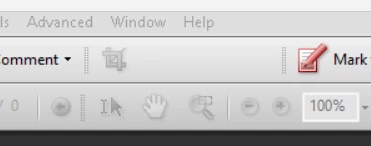
I would like to get rid of the empty space in the crop tool.  I did it before on another PC, but cannot find out how to do it.  Been searching for awhile and I guess I have not entered the right search word.

2 replies

JR Boulay
Community Expert
January 29, 2025

I have Acrobat 9, but only on Mac.

Go the View menu: No Labels, because otherwise this toolbar is not updated (bug ?).

Then revert to the previous setting.

Clicking on the small bar on the left and moving the toolbar may also update the display.


Acrobate du PDF, InDesigner et Photoshopographe
Rene Andritsch
Community Expert
January 29, 2025

You obviously already adjusted your toolbar in the menu “Tools > Customize Toolbars…”. From what it looks like you deselcted all of the “Advanced Editing Toolbar” tools except from the crop tool. Is that correct? Can you show a screenhot of your menu. Usually the space should just be collapsed. But for some areas it is possible that the space stays free like that.


What happens when you grab the vertical bar left to the crop tool and drag it from the tool bar to make it a floating tool bar. An then reintroduce it to that spot. Does that change anything?

chzuckAuthor
Inspiring
January 29, 2025

Toolbar snip is the way it was when I posted.  Toolbar2 snip is how it is now after I did what you suggested.  Now the empty space is to the left of the crop tool.  I am trying to duplicate my install that is on my desktop.  I will post a snip from there later.  Is there a way to copy the setup/preferences that I have on the desktop to the one that I am working on that is on my laptop?

Rene Andritsch
Community Expert
January 29, 2025

Maybe now try to drag out the tool portion with “Create, Combine … etc.” to have it floating an then put it back to its location. Maybe this also solves the empty space issue.
Despite being more work I would recreate the tool setup from scratch on your laptop not to introduce any quirks that would carry over. Also I’m not a Windows user, so I don’t know where you would have to look for such preferences, sorry.