


New Participant
August 1, 2019
Question

Measurement Font Changed?

  • August 1, 2019
  • 1 reply
  • 1558 views

Hi,

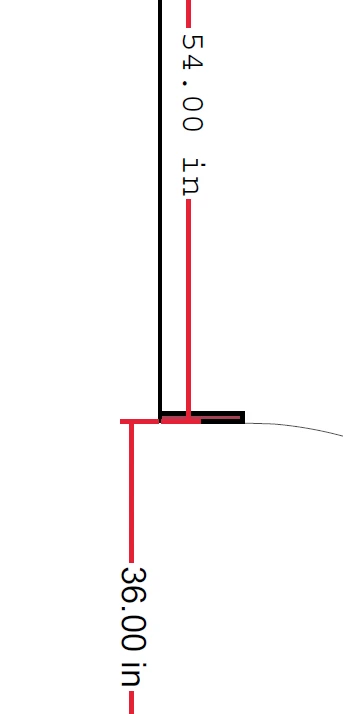
I have been using Acrobat to essentially create scaled drawings for room layouts for some time now and the font for the measurement tool has always been the same Arial-looking style. I was in the middle of working up a drawing today and out of nowhere the measurement tool font style changed to a Courier-looking style. I was looking online at how to change it back to match all of my work on the document and everything is telling me that the font style for the measurement tool cannot be changed. I am at a loss here. I am currently looking at two different measurements on the same document that have different font styles and I can't seem to do anything to fix it. I was wondering if there was an update or something but I did an update quite a while ago and there was a long process involved with installing the update which I did not go through today so I'm doubtful of that. I would rather not redo all of the measurements that I have already created to match this weird new font style so any tips would be greatly appreciated!
1 reply

Amal.
Community Manager
Community Manager
August 6, 2019

Hi There,

Apologies for the delay in response, I hope you would be able to fix it by now.

If the problem still persists, as stated above, the font changed to courier looking style, you may follow the troubleshooting steps below:

  • Go to Edit (Windows), Acrobat DC (Mac) > Preferences > Content Editing > select the appropriate font in the fallback font for editing and select the appropriate font in the default font for Add text.

  • Click Ok and reboot the application and check.

Also, you may please refer to the help article in the link  - Change default font for fallback in PDF editing and Add Text

Let us know if that works for you

Regards,

Amal

New Participant
August 6, 2019

I'm afraid that changing the setting as you suggested had no effect. I rebooted the program and everything but even after changing to
Arial in both fields, the Courier style still persists. I was able to change the other measurements to Courier fairly painlessly. Changing the caption placement for each one automatically changed the font so it went pretty quickly. I am still curious as to what happened to begin with though.

New Participant
November 10, 2020

I am having this same problem. I believe it first started happening after I used the Flip Line and Restore Caption Placement tools. Prior to that, I had been adding lots of measurements all day that all displayed in the original, Arial-looking font. Now, for any new measurements I place, or even if I try to move or change other properties e.g. color of an existing measurement, the measurement displays in the same serifed, Courier-looking font shown in the original post here.


I am using Adobe Acrobat Reader DC and do not have the Content Editing tab in my preferences window. I have tried both PC and Mac versions of the application, and I have tried reinstalling the application, to no avail.


Are there any other suggestions? Many thanks.