

Participant
February 3, 2018
Answered

Mirror PDF file

  • February 3, 2018
  • 4 replies
  • 133465 views

Hi, I've been e-mailed a technical drawing for building stud walls in a block of flats. However I've only got the left hand side flat drawings. Is there a way within Acrobat XI that I can flip the file horizontally?

Correct answer Luke Jennings

Thank you Karl Heinz Kremer. Your suggestion worked perfectly! We're trying to prepare POWERPOINT presentations to be used on a teleprompter. We're recording videos of "expert speakers." Our speakers sound much  more natural when they're speaking to their own POWERPOINT bullet points vs. reading from a written script using an unfamiliar piece of technology.


For the benefit of others who are looking for a way to flip PDFs, here is yet another way:

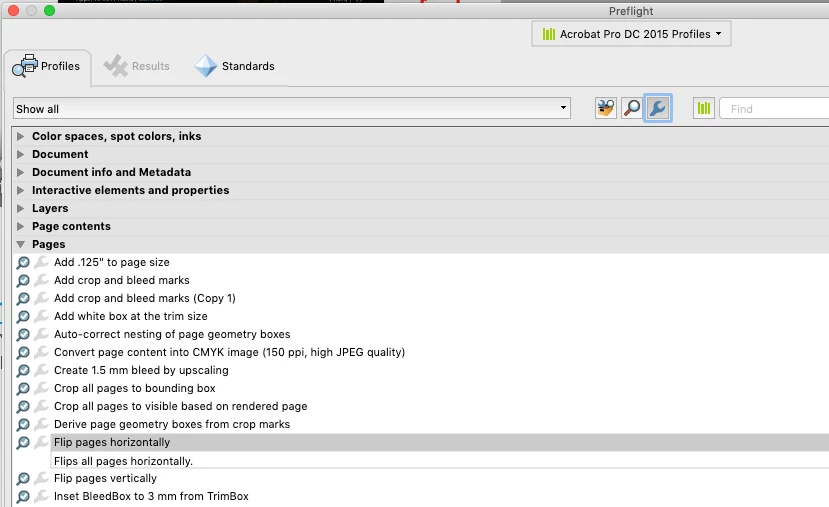
You can use an existing prefilght profile to flip the pages (Acrobat DC).

Tools> Print Production> Prefilght> (select the blue wrench icon).
4 replies

Participant
November 1, 2021

For those on a budget, I found converting the PDF to a jpeg, flipping in photos, then converting jpeg to PDF worked brilliantly. 

Participant
December 22, 2021

An elegantly simple solution! Even more so as I was searching for a solution to flipping a jpeg into a PDF!


Luke Jennings3
Community Expert
Community Expert
December 23, 2021

Another option- from Photoshop, Image> Image rotation> Flip canvas horizontal> File> Save-as> Format> Photoshop PDF.


Participant
August 25, 2020

Acrobat Pro XI

I've found a better way.  Zoom out so you can see the whole page. Go to Content editing and select Edit Text & Images. It will say the page doesn't have editable text or has scanned content AND it doesn't tell you but its now made the entire page an object. Left click on the scan and you'll see handles appear at the corners.  Now right click and flip it. Done!  Took a long time to find this. Happy!

Participant
October 25, 2022

This works so well. Thanks a million !! I need it to mirror truss layouts for garage left and / or garage right.

Joyce

Luke Jennings
Inspiring
February 7, 2018

Another option is to place the PDF into InDesign or Illustrator and export to (or save as, from Illustrator) a new PDF.

To mirror a placed object in InDesign go to Object> Transform> Flip horizontal.

To Mirror a placed object in Illustrator, it's Object> Transform> Reflect.

Of course all the dimensions will also be mirrored and hard to read. You can cover the old type and replace it before exporting to a new PDF, if it's important to you.

I should also mention you are also assuming the right side drawings are otherwise identical to the left (door swings, utilities, etc.)

Participant
February 7, 2018

That's exactly what I needed Luke, thanks! Door swings etc are not important as I'm just building the stud walls, dimensions I can easily copy over afterwards. Thanks again.

Adorobat
Community Manager
Community Manager
February 6, 2018

Hi Toonarmytel,

To rotate a page in a pdf file, click on the page thumbnail icon in the left-hand pane > select the page by clicking on it > right-click > rotate pages.

Select the direction, page range and save the file using File > Save option.

Below are the screenshots:

Let us know if you have any further questions.

Shivam

try67
Community Expert
Community Expert
February 6, 2018

Rotating is not the same as mirroring... I don't believe the latter is possible in Acrobat.

Luke Jennings3
Community Expert
Community Expert
August 17, 2022

Can you  add instructions again for Aobe crobat Pro DC as the above link is no longer working.Thanks in anticipation.


To mirror a pdf, go to Tools> Print Production> Preflight> Fixups (the blue wrench icon), type "Flip" in the search field, click Fix.

Edit, I see this was already discussed 4 years ago.