Craig,
OK. There are several issues here.
The first is that the PowerPoint document file was created with the embed fonts option of PowerPoint. The document currently has its options set for:
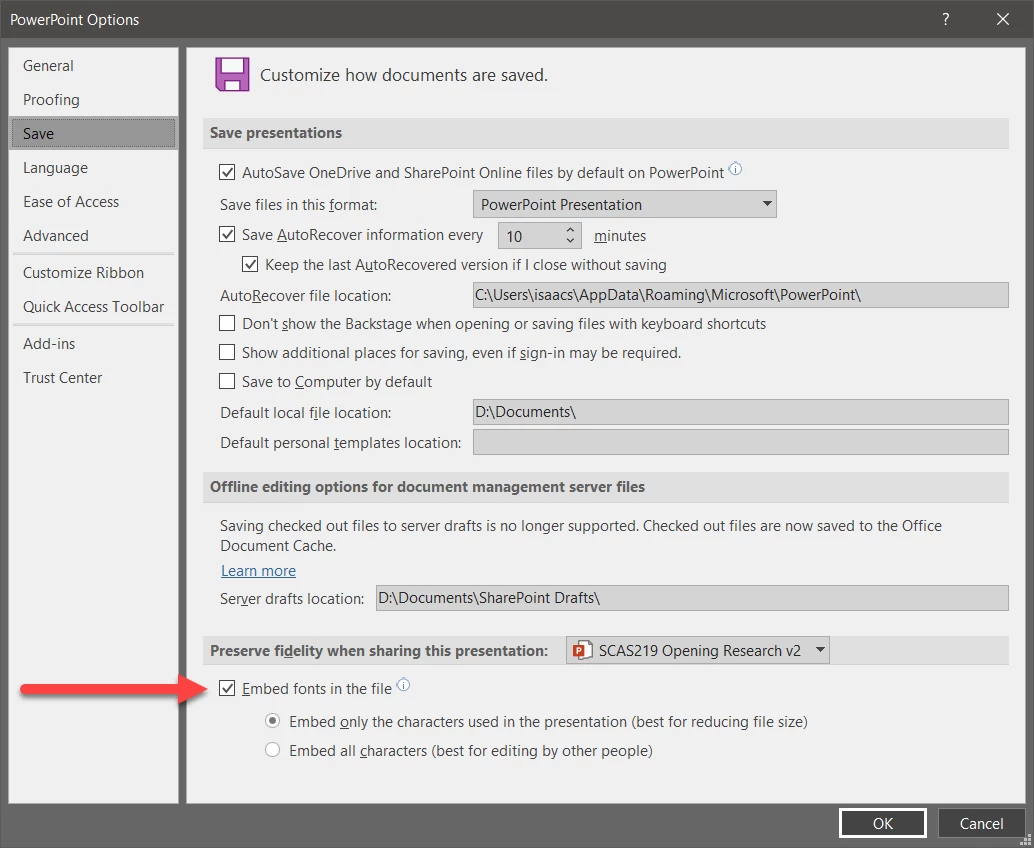
Disable that option both for this document and for any new, subsequent documents. It causes problem for printing and for saving PDF.
Saving your existing PowerPoint document with this option turned off solves part of the problem.
But wait, there's more and this additional problem is related to use of Open Sans Extra Bold. Apparently, there are two versions of this font, one labelled Open Sans Extra Bold and another labelled as Open Sans ExtraBold. In your PowerPoint presentation, you have text formatted in both of these fonts. For the record, the official version of this font that is distributed from Google is named Open Sans ExtraBold. I have edited the formatting in your PowerPoint file from Open Sans Extra Bold to Open Sans ExtraBold and resaved the file.
I then created the PDF file using the Save as Adobe PDF option of Acrobat (or the Create PDF option in the Acrobat tab on the PowerPoint ribbon). Voila, problems are gone.
I am attaching the fixed PowerPoint file and the resultant PDF file. You can download the full, official Open Sans font family from https://fonts.google.com/specimen/Open+Sans?selection.family=Open+Sans .
Happy New Year.



 AdChoices